








Industries · High-tech, import and services

AI and automation for high-tech, import and services companies

Less typing into the ERP, more answers on time

Zooz-Tech builds enterprise AI agents and automation for high-tech, import and services companies inside Salesforce, SAP, Priority ERP and Dynamics 365: knowledge for the service team, invoices, approvals and export documents. Everything runs on the systems you already use, within their permissions.

Copilot StudioMCPSalesforceSAPPriorityDynamics 365 F&OPower AppsPower Automate
Clients in this industry
  • Allot
  • Moroccanoil
  • Gil Car
  • AlgoSec
  • Dr. Pach VeTzeva
  • Tadiran
  • Tempo Beverages
  • Keshet
  • UBTECH
  • SodaStream

In short

Zooz-Tech, a software development company and Microsoft Partner in Israel, part of the Peax group (listed on the Tel Aviv Stock Exchange), has built seven solutions for high-tech, import and services companies that run today: a knowledge assistant for Allot inside Salesforce, export automation for Moroccanoil in Dynamics 365 F&O, an invoice agent for Gil Car working with SAP on-prem, invoice approvals for AlgoSec in Priority ERP, the Lego Lab for Dr. Pach VeTzeva, Document AI for handwriting and field documents for Tadiran, and an Outlook add-in that summarizes email threads. The agents reach core systems through a controlled MCP layer, and a person approves every write.

Industry challenges

What slows down teams at high-tech, import and services companies?

The processes themselves are familiar: a service case, an export shipment, a supplier invoice and an approval round. What slows them down is the manual work in between: searching, typing, emails and checking by eye.

Knowledge stays with whoever solved it

A customer reports an issue, and the agent searches logs and the knowledge base, or asks whoever solved it last time.

Manual typing into the ERP

A packing list arrives by email and is typed into the ERP, and export documents are prepared one by one. A supplier invoice in PDF is typed into SAP, and duplicates are checked by eye.

Approvals that travel by email

An invoice waiting for approval moves between approvers by email, it is hard to know who has it, and someone updates Priority at the end.

Change without knowing its effect

You build a solution for a process, and only after it goes live do you find out what it did to the metrics.

Our projects in this industry

Which projects have we built for high-tech, import and services companies?

Every project in this industry, by client: what we built, how it worked before and what changed. In each one, the AI or automation works inside a system the client already had.

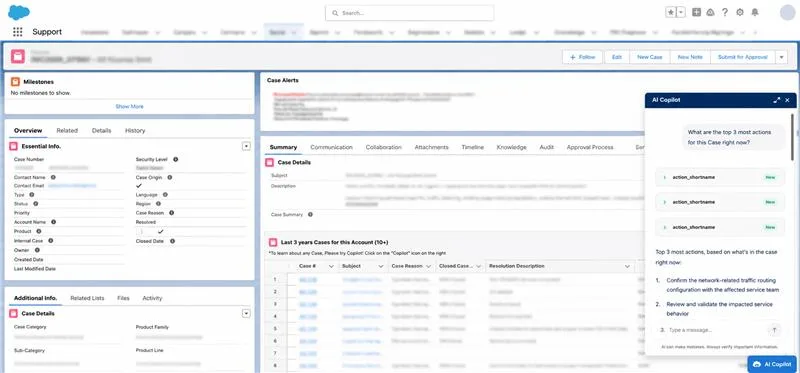
Copilot inside the Case screen in Salesforce
Allot

A knowledge assistant for service teams in Salesforce

A Copilot that sits inside the Case screen in Salesforce and brings the agent what the organization has already solved, without leaving the work screen.

  • Reads the case and its context from the Case screen
  • Searches what has already been solved: cases, logs, processes and the knowledge base
  • Recommends similar cases and solutions that worked
  • Inherits Salesforce permissions in full
BeforeThe agent searches logs and the knowledge base, or asks whoever solved it last time.
NowRecommendations based on the case context, inside the Case screen.

Answers from cases already solved, within Salesforce permissions

Microsoft CopilotSalesforce
Allot project card →
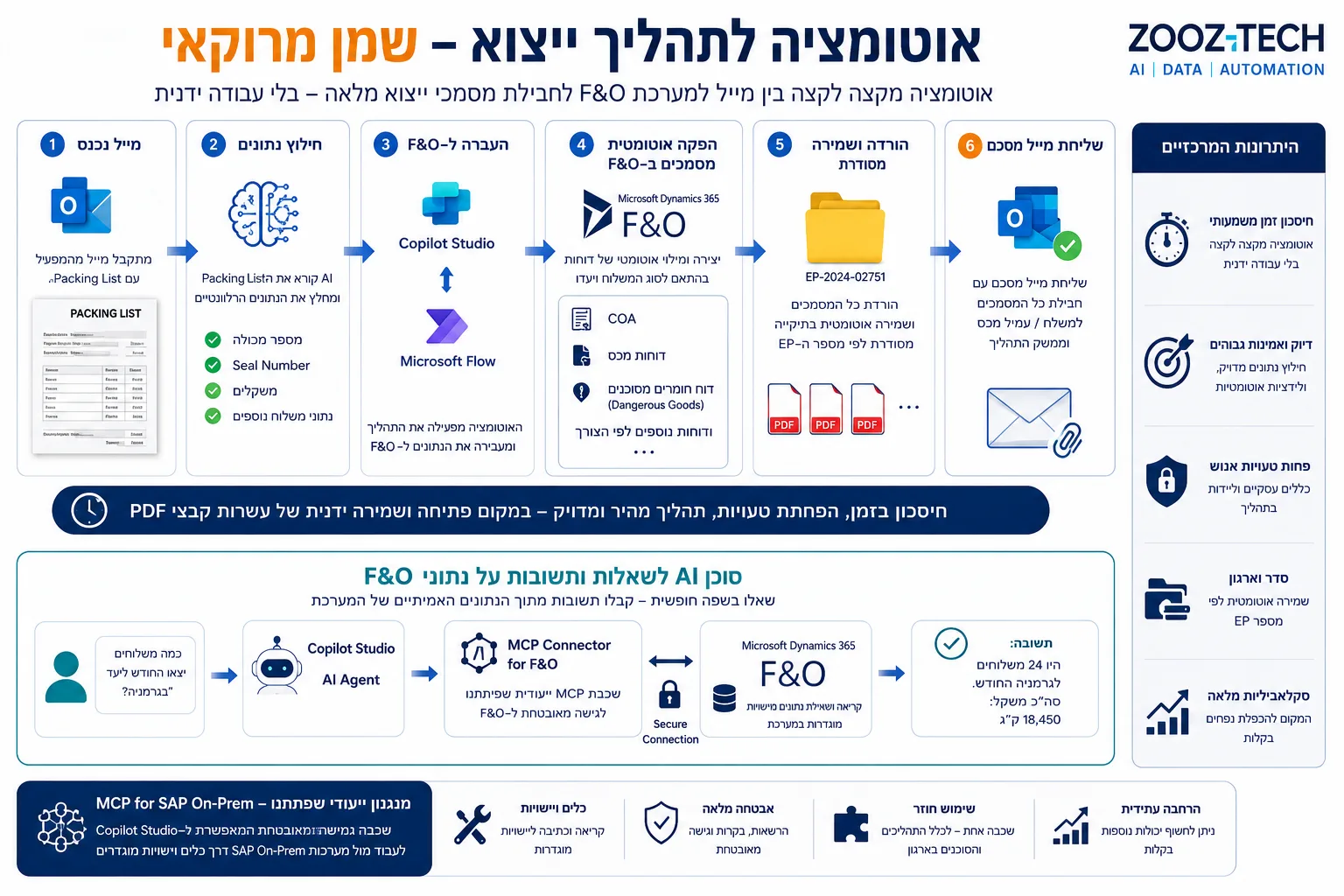
Moroccanoil export process automation in Dynamics 365 F&O
Moroccanoil

Export process automation in Dynamics 365 F&O, and an agent on the data

Automation that turns one email with a packing list into a complete export document package in Dynamics 365 F&O, plus an AI agent that answers free-form questions about the data.

  • An email arrives with a packing list attached
  • The data is read from the file and records are created in F&O
  • The export document package is ready, and an email goes to the next party
  • An AI agent answers free-form questions about F&O data through an MCP layer, with no direct database access
BeforeThe data is typed into the ERP and the export documents are prepared one by one.
NowFrom one email to a complete export document package in F&O.

A complete export package from one email

Copilot StudioD365 F&OMCP
Moroccanoil project card →
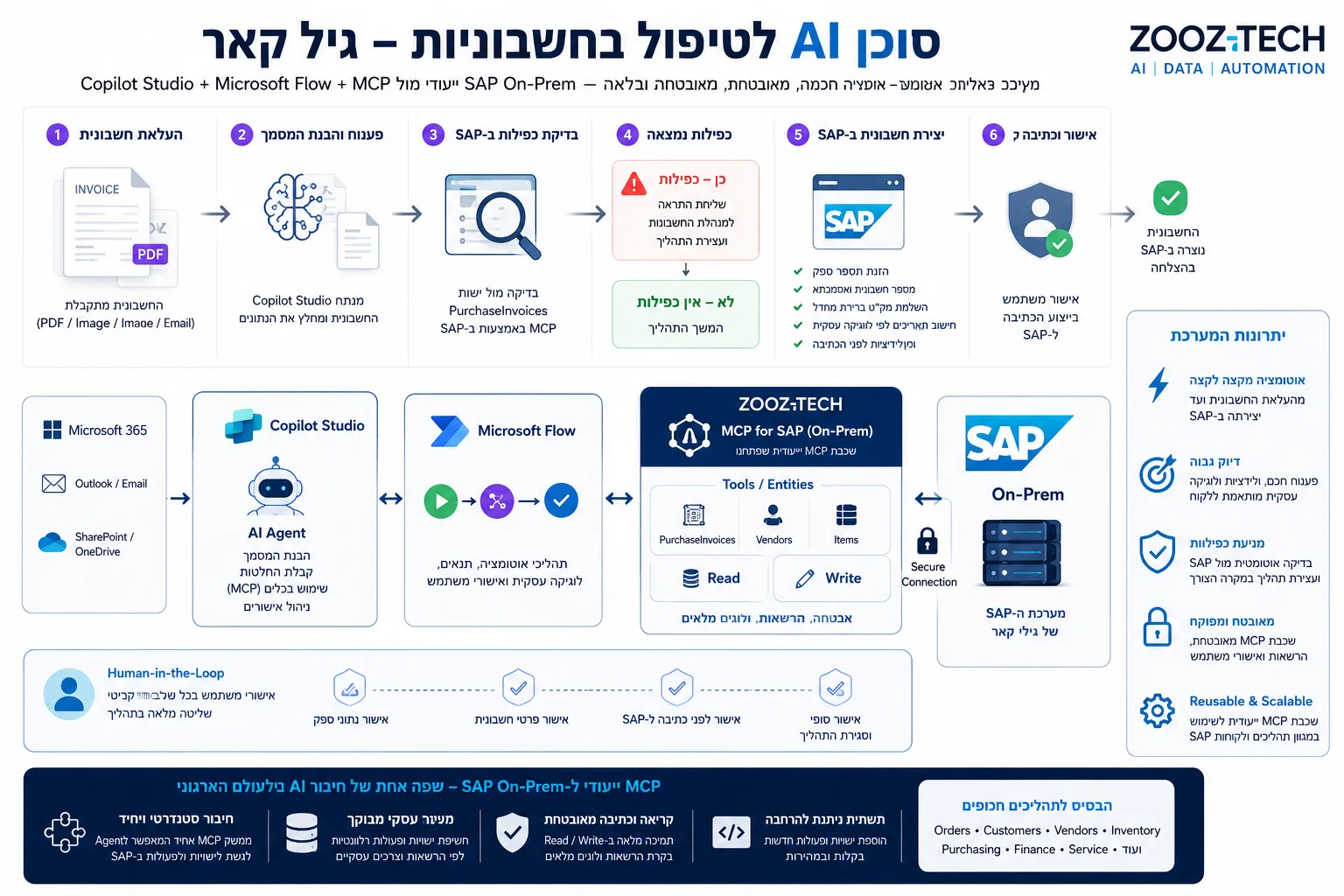
Gil Car's invoice process and the MCP layer working with SAP
Gil Car

An invoice agent working with SAP on-prem

An agent in Copilot Studio that reads supplier invoices, checks them against SAP data and creates a draft in JournalVouchers through a dedicated MCP layer, even when SAP runs on-prem.

  • The invoice is read, from a PDF or an image
  • A check against existing records in SAP prevents duplicates
  • Four dates are calculated in Power Automate, in a predefined flow
  • A draft is saved in JournalVouchers through the MCP layer
  • An authorized user reviews and approves every draft inside SAP, and only then is the final posting made
BeforeEvery invoice is typed into SAP manually, and duplicates are checked by eye.
NowThe agent prepares a checked draft, and an authorized user approves it inside SAP.

The final posting happens only after manual approval inside SAP

Copilot StudioMCPSAPPower Automate

Gil Car project card → · What MCP is, and how it connects an agent to SAP

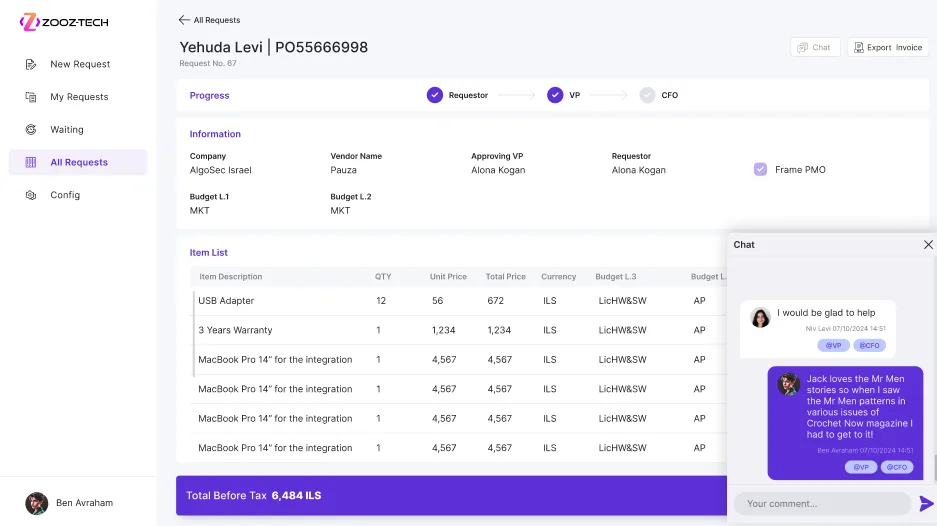
Invoice approval against Priority in AlgoSec's app
AlgoSec

Invoice approvals in Priority

A Power Apps app for invoice approval rounds, with actions performed directly in Priority ERP. The approval updates the system and completes the process.

  • The invoice goes out for approval straight from Priority
  • A dynamic approval round, each approver in turn
  • The approver acts in Priority from within the app
  • At the end of the round, Priority is updated automatically
BeforeThe invoice moves between approvers by email, and someone updates Priority at the end.
NowA documented approval round, with actions directly in Priority.

A documented approval round, inside Priority

Power AppsPriority
AlgoSec project card →
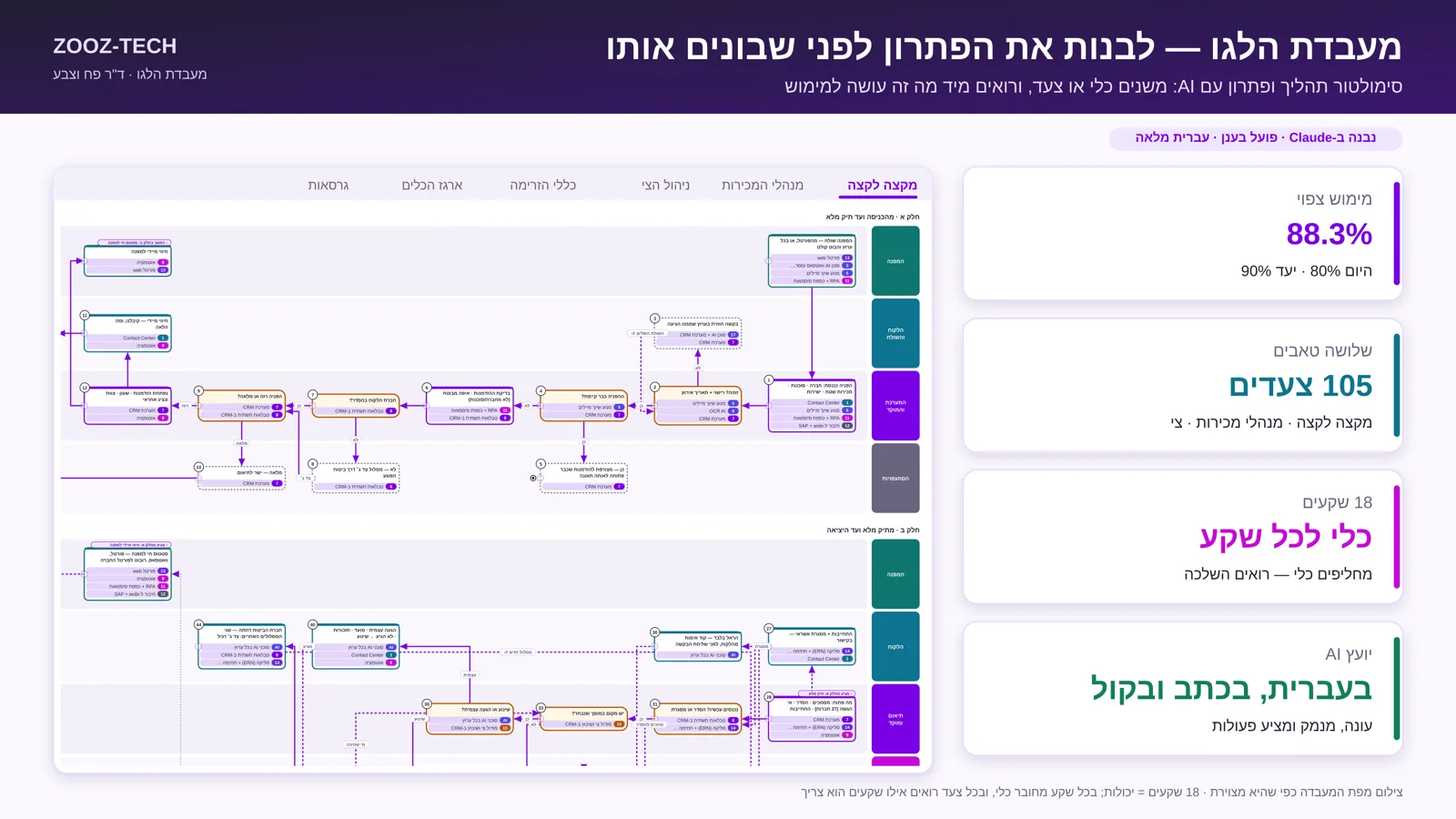
The Lego Lab: the process map and metrics
Dr. Pach VeTzeva

The Lego Lab: a process simulator with an AI advisor

The Lego Lab is a simulator of the process: you test the solution before you build it. Swap a tool or a step, and see the effect on the KPIs right away.

  • A model of the process: the steps and tools on one map
  • Swap a tool or a step, without building anything
  • The effect on the KPIs shows immediately
  • An AI advisor that answers from all the project materials, in text and by voice in Hebrew, and cites a source in every answer
  • The project materials (Word, PDF, PowerPoint and Excel) are indexed with search tuned for Hebrew
BeforeYou build the solution, and only after it goes live do you find out what it did to the metrics.
NowYou test the solution on a model of the process, before building it.

See the process before you change it

SimulationRAGVoice in Hebrew
Dr. Pach VeTzeva project card →
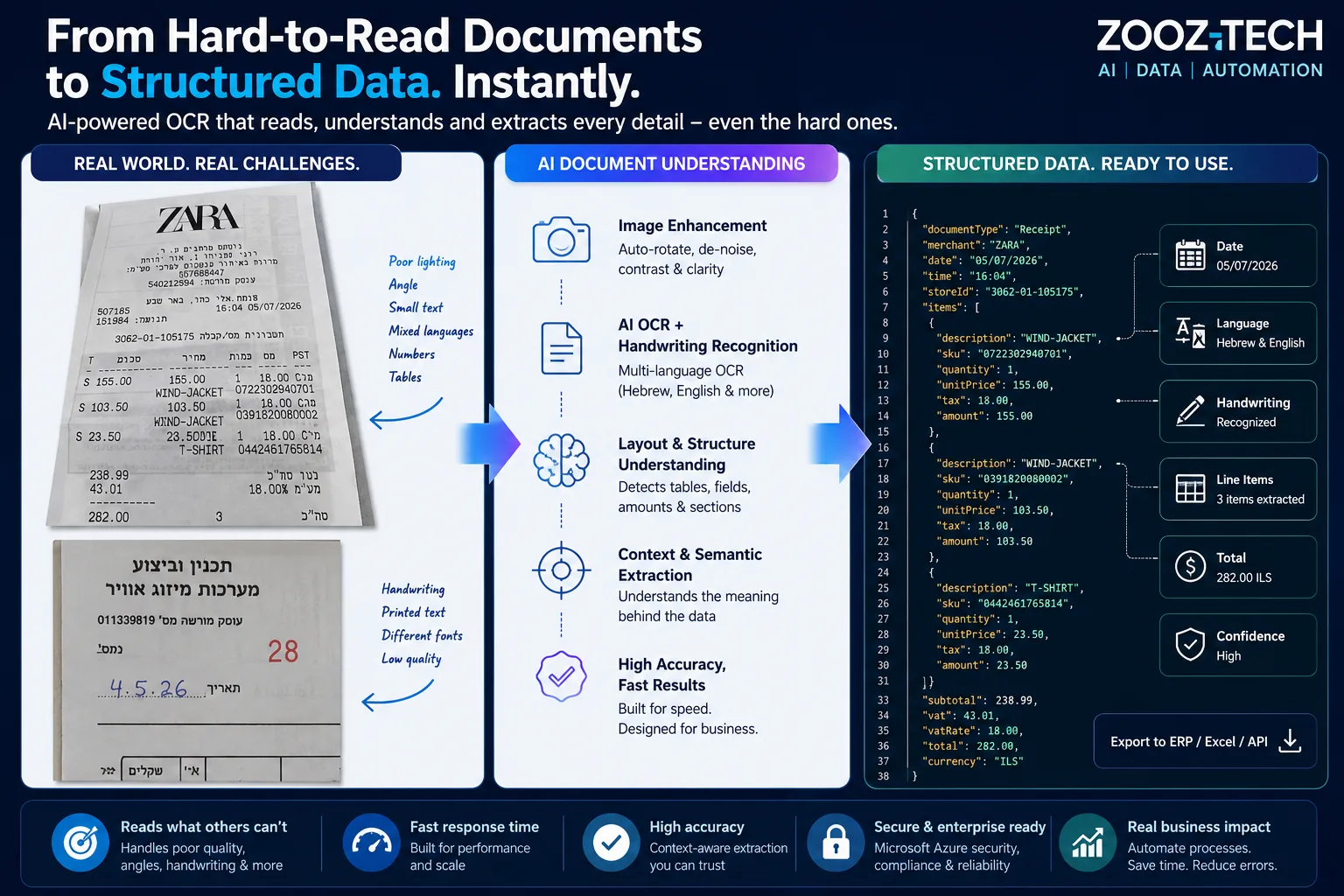
Tadiran Document AI: from a hard-to-read document to structured data
Tadiran

Document AI for handwriting and field documents

A system that understands documents the way a person does: handwriting next to print, receipts photographed at an angle and in poor light, tables, amounts and dates, in Hebrew and English. The output is structured data that goes straight into the business process.

  • The document comes in as a phone photo, a scan, a PDF or an email
  • The image is straightened and enhanced, and printed text and handwriting are recognized
  • The system understands what each value is: when 282.00 appears, it understands whether it is a total, VAT or an item price
  • Amounts, dates, identifiers and line items come back with a confidence level for each field
  • A vision model steps in when a document is hard to read
BeforeData is typed in by hand, because standard OCR breaks on handwriting, skewed photos and poor light.
NowStructured JSON for the ERP, Excel or an API, with a confidence level for each field.

Structured data, even from the hardest documents

Azure AI Document IntelligenceAzure OpenAIHandwritingMultilingual OCR
Tadiran's full project story →
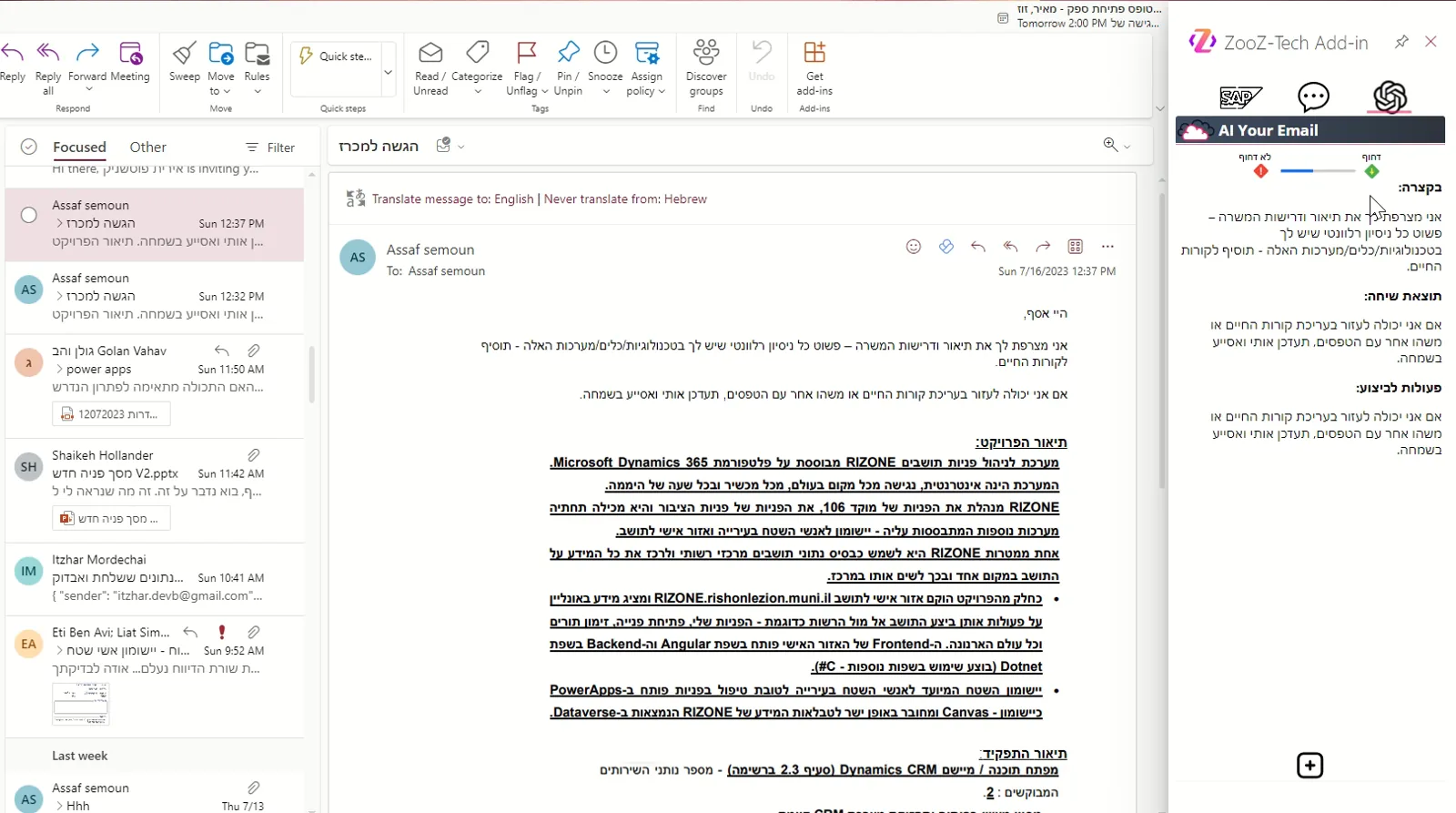
An Outlook add-in summarizing an email thread
Microsoft 365

Outlook add-in: AI summaries of email threads

An add-in that sits inside Outlook and summarizes long email threads, so the team gets the picture without reading the whole correspondence. The AI comes to the inbox, with no extra screen.

BeforeTo understand what happened in a long thread, you read the whole correspondence.
NowA summary of the thread, inside Outlook.

AI inside the inbox

Outlook Add-inAzure OpenAI
Solution card in the industry deck →

More clients in this industry: Tempo Beverages, Keshet, UBTECH and SodaStream. All clients and projects

How it connects

How does an AI agent reach SAP or Priority without opening them wide?

The agent reaches the ERP through a controlled gate, not an open door. This is how it is built, from where the team works down to the core system.

  1. Where the team works

    The agent sits where the team already works: Teams and Microsoft 365, the Case screen in Salesforce, or an add-in in Outlook. No extra screen and no copying text.

  2. The agent

    Our default: Copilot Studio for internal processes that live in Microsoft 365, and Azure AI Foundry for customer-facing bots. We re-check this in every project.

  3. The knowledge

    Solved cases, logs, processes and documents are indexed in Azure AI Search, and each user gets answers only from what they are allowed to see.

  4. The MCP layer

    One reusable layer that exposes only defined entities and actions to the agents, with a full log. Every write goes through validation, a duplicate check and user approval.

  5. Core systems

    SAP, Priority, Dynamics 365 F&O and Salesforce, including on-prem behind a firewall, through an on-premises data gateway and with no secrets in the browser.

Live reads, controlled writes: we start with reading, and add writing only where the process justifies it. This is how it runs at Gil Car, Moroccanoil and AlgoSec.

How we work

How do you start an AI project at a high-tech or import company?

Start with one process, on your data, and expand from there. You decide on the investment after you have seen the solution working on your information.

  1. Discovery

    A workshop with the process owners and IT, and a first demo that you approve from a business standpoint.

  2. POC on your data

    A working version against your ERP or CRM, with a scope and date set in advance.

  3. Go / No-Go

    Measure against the success metric, and decide together whether to continue.

  4. Development in sprints

    A working system at the end of every sprint, with feedback going into the next sprint.

  5. Phased rollout

    A first group of users, then expansion, with the same team.

Connected to the ERP and CRM

SAP, Priority, Dynamics 365 and Salesforce, and custom connectors when no ready-made connector exists.

A person approves every write

Validations, a duplicate check and user approval before every posting, and a log of every action.

On the infrastructure you have

A fast go-live, on the Microsoft infrastructure and licenses that already exist in the organization.

Certified, and the same team

Microsoft Partner, ISO/IEC 27001, and the same team supports you after go-live.

The full work plan: Delivery & POC

Frequently asked questions

Can you connect an AI agent to SAP on-prem?

Yes. For Gil Car, Zooz-Tech built an MCP layer that lets an agent in Copilot Studio check against SAP on-prem data and create a draft in JournalVouchers. An authorized user approves every draft inside SAP.

Does the agent write data to the ERP without approval?

No. Every write goes through validation, a duplicate check and user approval, and every action is logged. We start with reading, and add writing only where the process justifies it.

Can a Copilot inside Salesforce expose information the agent is not allowed to see?

No. The assistant Zooz-Tech built for Allot sits inside the Case screen and inherits Salesforce permissions in full, so recommendations are based only on what the agent is allowed to see.

Which ERP and CRM systems do you work with?

SAP, Priority ERP, Dynamics 365 (including Finance & Operations) and Salesforce. When no ready-made connector exists, we build a Custom Connector. Field documents reach them too: the Document AI Zooz-Tech built for Tadiran returns structured JSON to the ERP, to Excel or through an API.

How do you start, and when do you decide on the investment?

Choose one process, such as invoices, exports or knowledge for the service team, and we build a POC against your systems, with a scope and date set in advance. You decide together with us whether to continue after you have seen the solution working on your information.

Which of your processes still runs on typing and email?

Choose one process: invoices, exports or knowledge for the service team. We will come back with a POC proposal against your systems: what we build, what counts as success and when we present.

Book a callView the industry deck