
Groupy: teams of AI agents that diagnose, resolve and execute
Groupy is an enterprise platform for building, running and governing teams of AI agents, built on Microsoft Agent Framework. Build your own processes, or run ready-made solutions such as a complete HelpDesk.
A single chatbot doesn't fix problems. It only explains them
Most enterprise AI solutions stop at the answer. The employee still does the work alone, IT still gets the ticket, and the cost of the models stays invisible.
Recurring load on IT
Printer, VPN, slow computer, permissions. The same issues and the same steps, every single week.
Scattered knowledge and tools
Tickets in one system, knowledge in documents, automation in scripts. There is no single place that connects diagnosis, execution and documentation.
AI costs without control
Every department on a different model, with no view of cost per user, no budget and no way to pick a cheaper model for simple tasks.
What is multi-agent AI?
Multi-agent AI, or a multi-agent system, is a way to build AI like a team rather than a single employee. Instead of one model trying to do everything, several AI agents work together. Each agent has a defined role, its own tools and its own access to systems, and a manager agent splits the task, passes information between the agents and checks the result before it reaches the user.
The advantage is accuracy and control. An agent that specializes in a narrow domain makes fewer mistakes, every step is logged and can be reviewed, and you can add a human approval gate before any sensitive action. This is how AI moves from giving advice to doing work end to end.
A team, not a chatbot
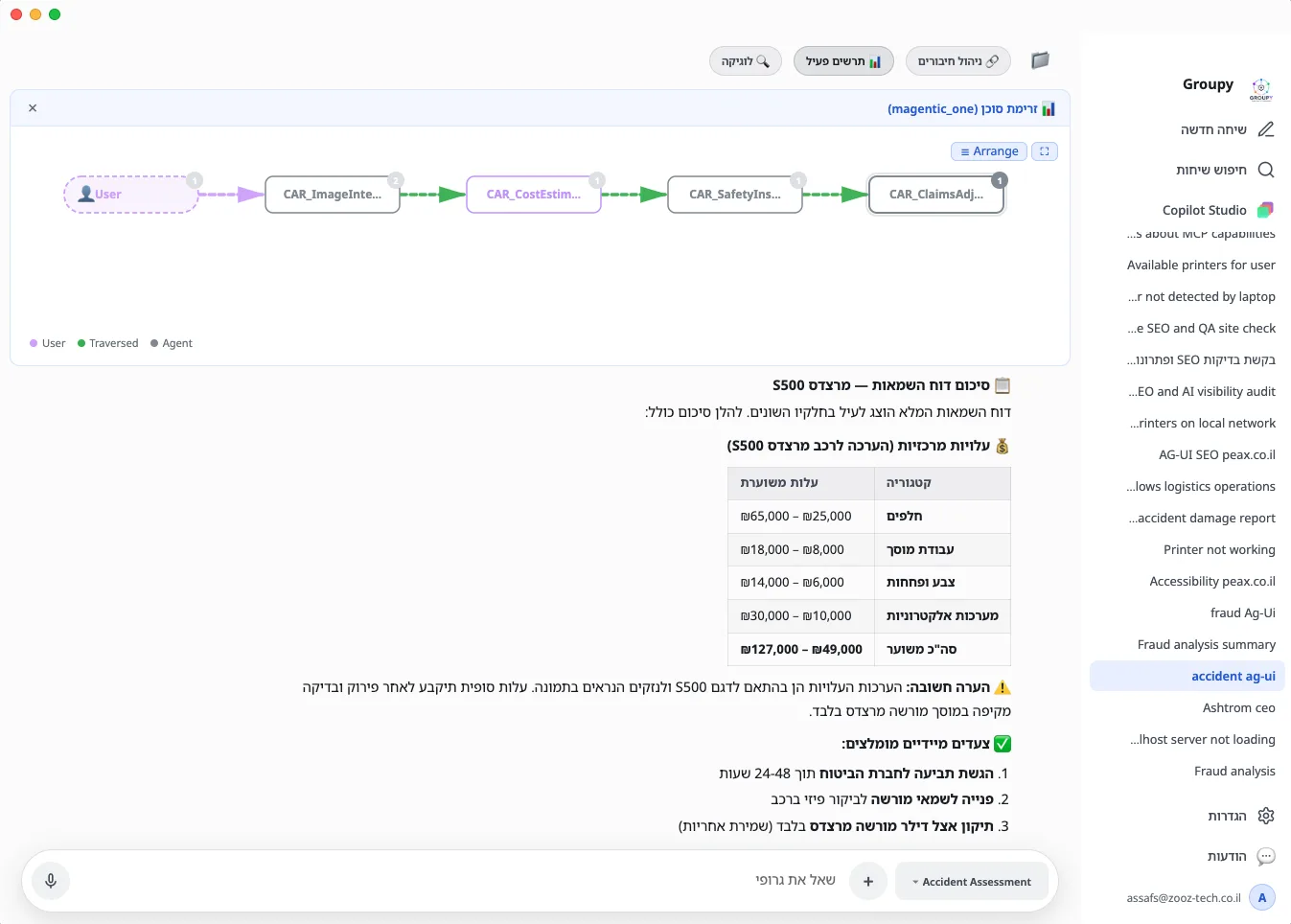
Each agent has its own role, instructions, tools and knowledge. The team manager plans, splits the task, picks the next agent and consolidates one verified answer for the employee.
Similar cases from the knowledge base
Confirms the commands are safe
Runs commands on the computer
Opens and updates them in monday.com
A platform to build on, or a ready-made solution
Build it yourself
Describe the team in one sentence, and the system asks 3 to 5 focused questions and builds it: agents, tools, orchestration style and connections. The same goes for processes, from a prompt to a workflow with human approval gates.
Ready-made solutions
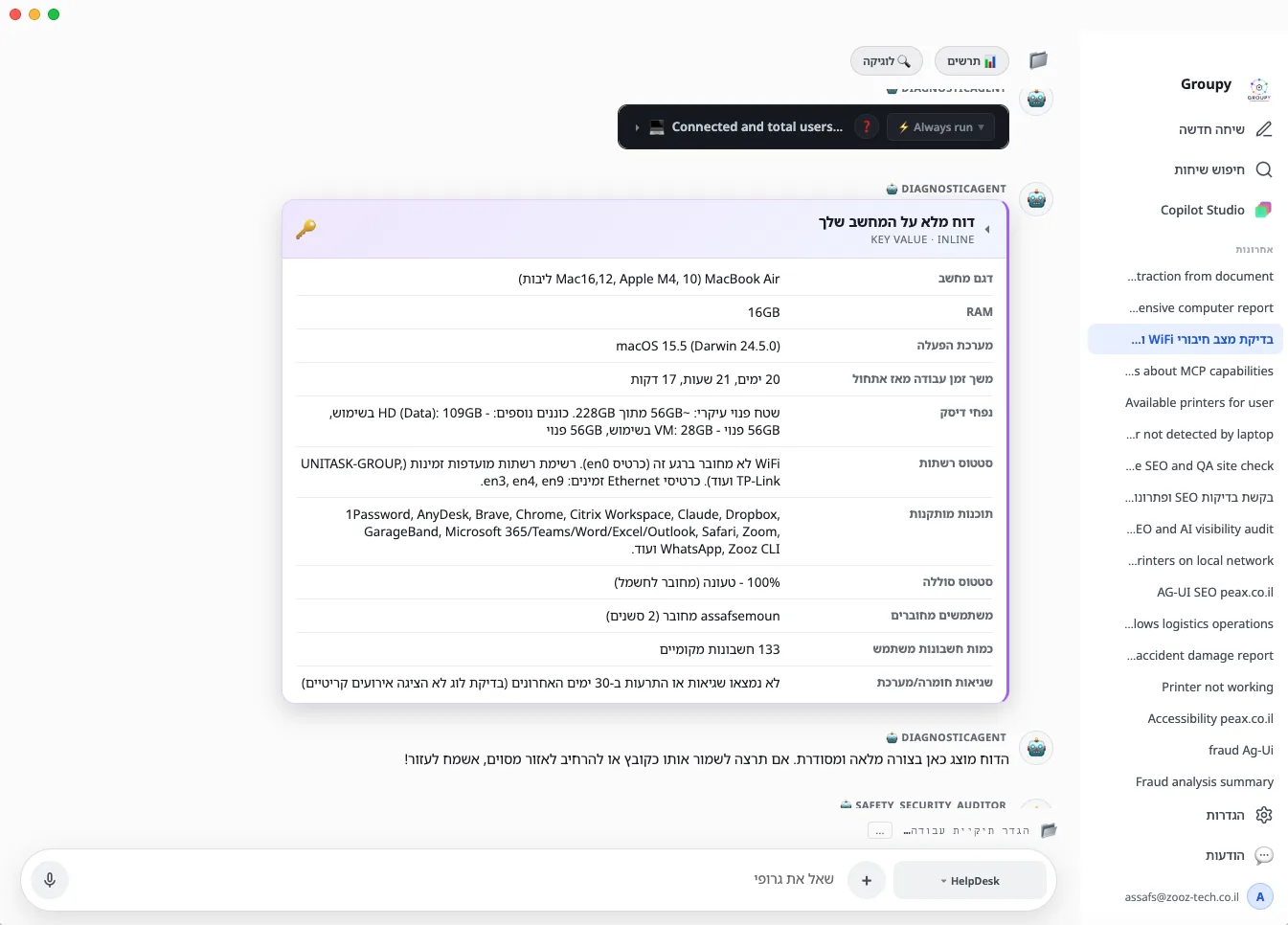
Complete business processes that Zooz-tech builds and operates, with a dashboard for each solution. The first one: a HelpDesk that diagnoses and fixes issues on the employee's computer and opens a ticket only when needed.
Diagnoses, fixes on the employee's computer, and opens a ticket if needed
Identifying the problem
The employee describes the issue in their own words and attaches a screenshot. The team asks questions only when information is truly missing.
Diagnosis on the computer itself
The diagnostic agent runs checks through the desktop app. Every command is approved by the employee, according to policy.
Resolution and verification
The team applies the fix, checks that it worked and explains to the employee in plain language what was done.
Smart escalation
No fix? A ticket is opened with the full history and diagnosis, updated throughout the conversation and closed once the issue is confirmed as resolved.
The agent comes to the employee, not the other way around
The same team is available on every channel, and in every conversation you can talk to the agents and get a spoken answer. The execution itself happens on the employee's computer, and the server never touches it.
Desktop
Windows, macOS and Linux, with automatic updates
Web
In the browser, no installation
OTP verification, images and documents
Telegram
A bot with buttons
On your website
An embedded widget, in your design
Every team, every run and every shekel, in one place
Workflow Studio
Nodes for agents, tools, human approval gates and MCP connectors, with versioning and a complete process from a prompt.
Control Tower
Success rate, automation coverage, cost per day and a "needs attention" queue.
Usage and costs
Cost per user and per process, budgets, and model selection per task.
Roles and permissions
System admin, manager and employee, with access requests for locked teams and agents.
Knowledge base
Collections from your organization's sources, plus knowledge gathered from every conversation for a faster answer next time.
Triggers and API
Schedules, signed webhooks from systems such as SharePoint, Dynamics, SAP and Priority ERP, or activation through the API.
Built on
Want to see a team at work?
A 30-minute demo on a process from your organization.