
Dynamics 365 CRM implementation and development for organizations in Israel
Dynamics 365 that works for your customers, not just for the system
Zooz-tech implements and develops Dynamics 365 and Dataverse, builds customer and resident portals in Power Pages, connects your CRM to SAP, Priority ERP and Salesforce, and adds an AI layer that works within your existing permissions.
From requirements to the AI on top of your CRM
Implementation and configuration
Dynamics 365 Customer Engagement and Dataverse: entities, security roles, processes and views, shaped around the way your organization works.
Dynamics 365 Field Service
Service calls and field teams: work orders, technician scheduling, a mobile field app and preventive maintenance, all connected to customer data in the CRM.
Power Pages portals
Self-service areas for customers and residents, with sign-in, forms, case tracking and dynamic content, all on the same data.
Integrations
Two-way sync with SAP, Priority, Salesforce and on-premises systems, through Azure and Power Automate.
Dynamics 365 F&O
Automation of operations and export processes, plus an AI agent that answers open-ended questions about your ERP data through MCP.
AI inside the CRM
Copilot for agents, case classification and routing, duplicate detection and draft replies, all within Dynamics permissions.
Maintenance and ongoing support
We stay on after go-live: maintenance, improvements and new development as your needs evolve.
When should you implement Dynamics 365?
Dynamics 365 is the right fit when your organization needs a single view of the customer across every touchpoint: sales, service and field work, with processes, permissions and reporting in one place. The familiar signs: customer information scattered across spreadsheets and email, requests that fall through the cracks, and no way to know where a customer stands without asking several people.
Customer service and contact center
Requests from every channel in one place, queues and SLAs, full history for the agent, and Copilot suggesting a reply.
Sales
Leads, opportunities, quotes and sales forecasting, with one consistent sales process for the whole team.
Field work
Field Service: work orders, technician scheduling and a mobile field app, connected to the service case and the customer's data.
Integrations and a single customer view
Connections to SAP, Priority and your core systems, so orders, invoices and inventory are visible on the customer record.
What does an implementation project look like?
Seven stages, from requirements to a system your users actually work in. Each stage is signed off with them before we move on to the next.
Requirements and design
Processes, users, data and integration points, as they work today.
Architecture
Dataverse structure, security roles, interfaces and choosing the right modules.
Development and configuration
Entities, processes and views, Power Pages portals and automations.
Migration
Moving data from legacy systems, with cleansing, deduplication and mapping.
Testing
Process, permission and data testing with the users themselves, before go-live.
Go-live
Training for users and administrators, a phased rollout and close support in the first days.
Maintenance and improvement
We stay on after go-live: support, improvements, new development and AI capabilities.
Dynamics 365 at our clients
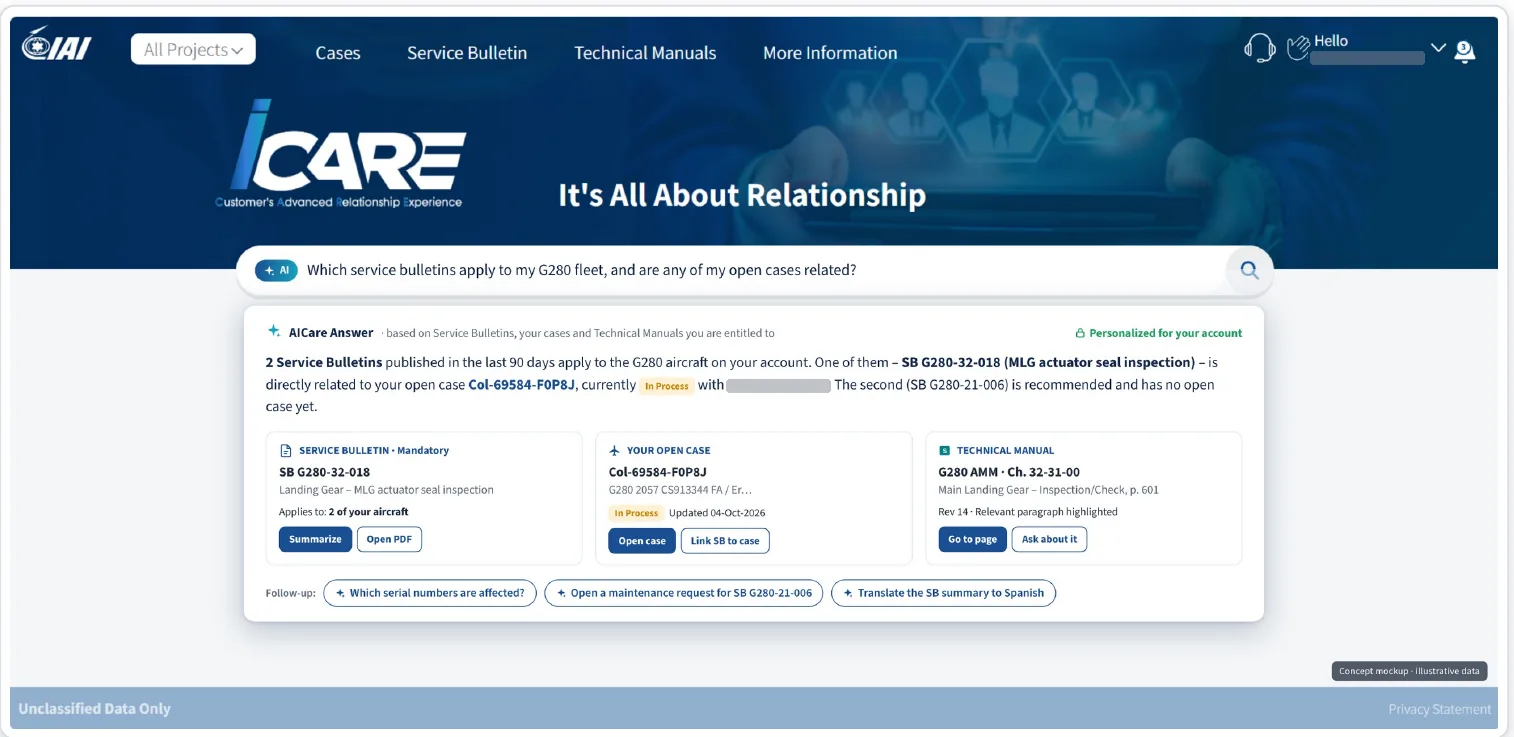
The iCare customer portal and the AICare layer
A Power Pages portal on Dynamics 365 that we built and maintain: service requests, shipments, Service Bulletins and technical documentation, and now an AI assistant that works by text and voice.
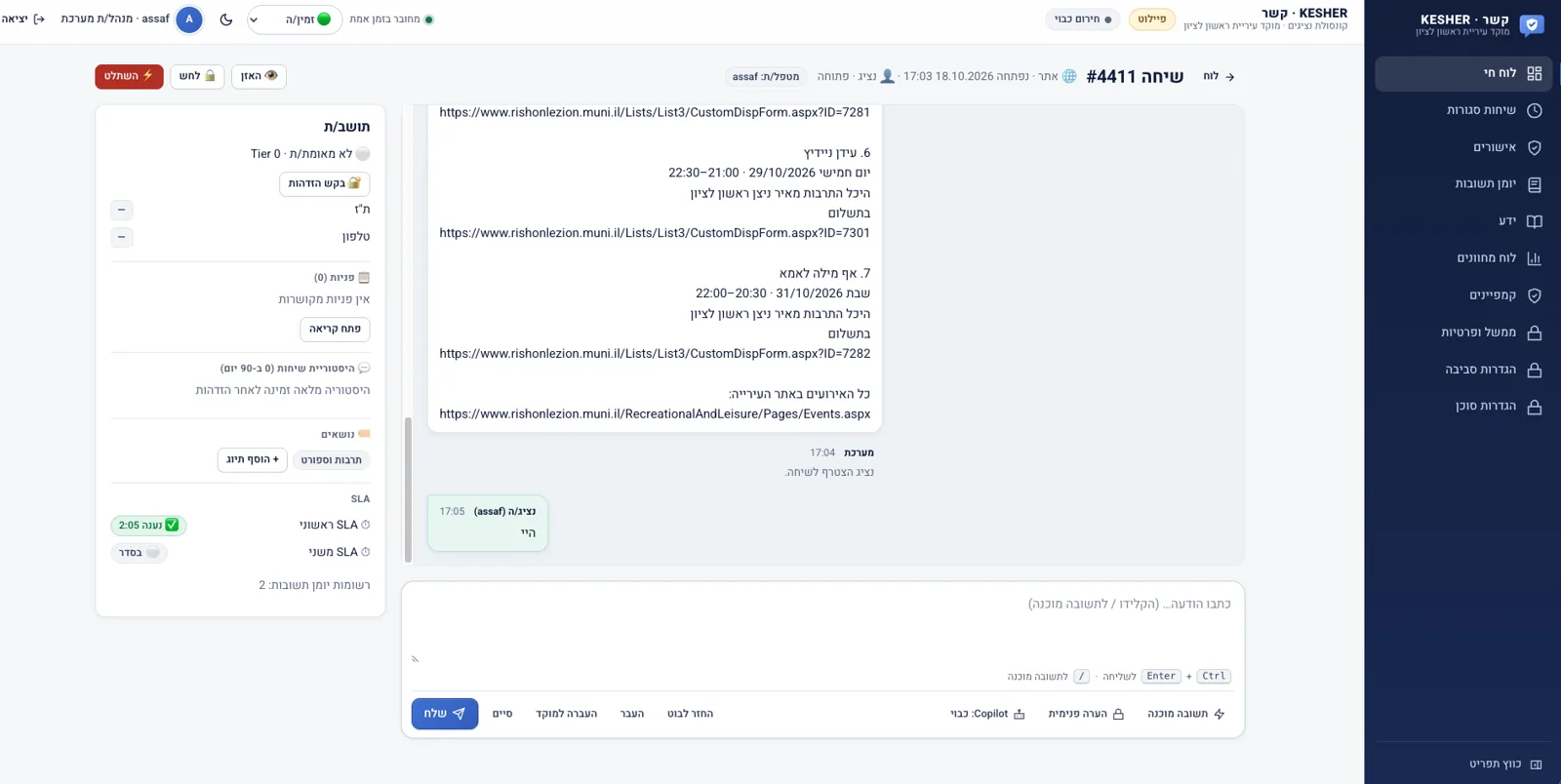
Resident service connected to Dynamics 365
Every KESHER call is logged in the municipality's CRM, the agent sees the full history, and a case opens in the CRM with one click.
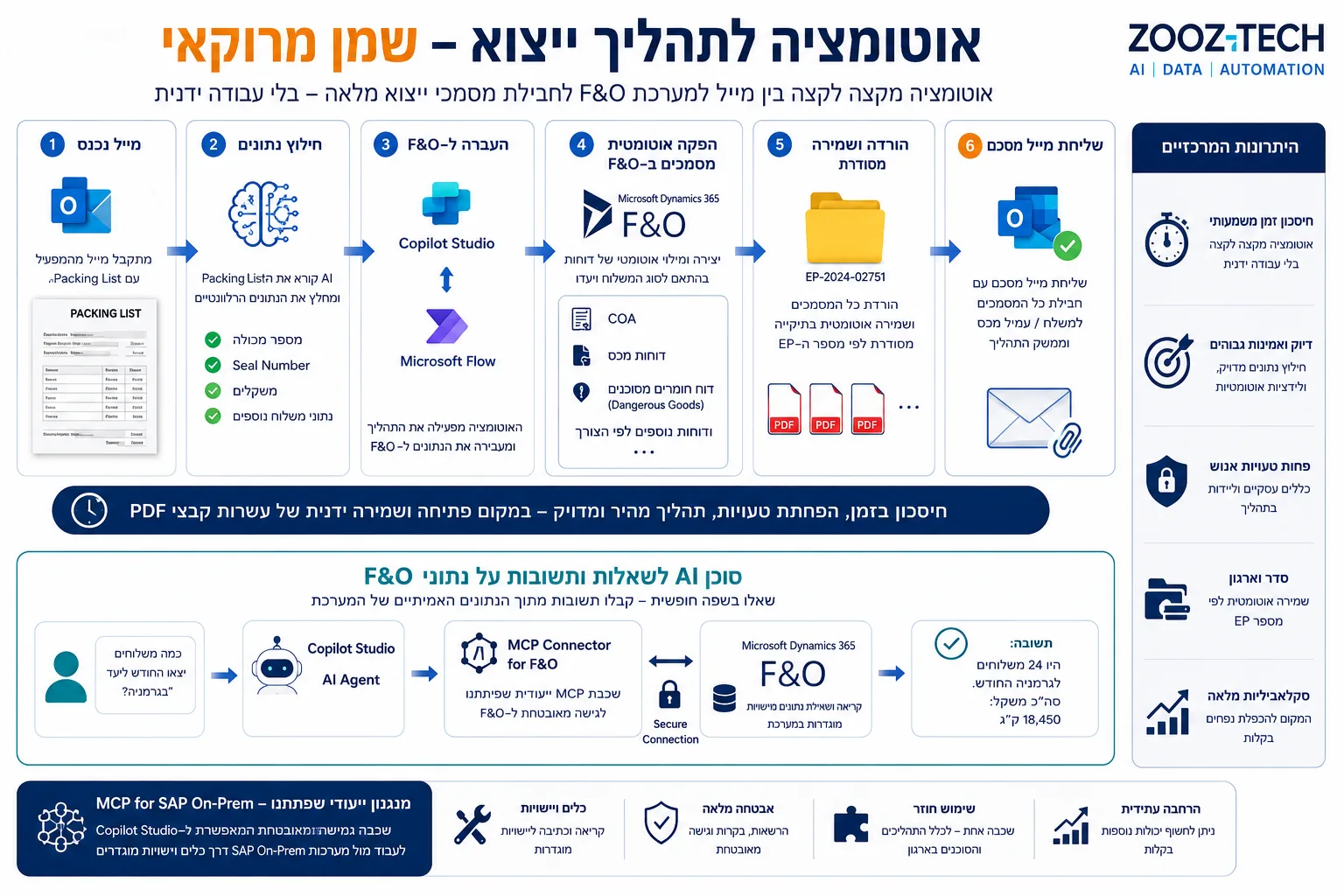
Export automation in F&O
From a packing list email to a complete export document package in Dynamics 365 F&O, plus an AI agent for questions about the data.
When Dynamics 365, and when Power Apps?
Dynamics 365 is the right fit when the process is sales, service or field work, and an off-the-shelf CRM already covers most of it. Power Apps is the right fit for a process that is unique to your organization and has no ready-made product. Both run on the same Dataverse, so you usually don't have to choose: run the CRM in Dynamics 365 and build Power Apps around it for the supporting processes.
Dynamics 365 is the right fit when…
You have sales, customer service or Field Service processes that an off-the-shelf system already knows how to manage. You need full customer management, queues and SLAs, and built-in Copilot for agents. Large teams work in the system all day.
Power Apps is the right fit when…
The process is unique to your organization: approvals, requests, forms or field work with no ready-made product. You need a focused app for a specific group, and you want to start small and move fast.
Frequently asked questions
How long does a Dynamics 365 implementation take?
It depends on scope: the number of processes, the volume of data to migrate and the number of systems to connect. We recommend starting with a focused first phase, for example a single service process, taking it live and expanding in stages. We give a precise timeline after the requirements and design phase.
Do you implement Dynamics 365 Field Service?
Yes. Zooz-tech implements and configures Field Service: work orders, technician scheduling, a mobile app for field staff and preventive maintenance, all connected to customer data in the CRM.
Can Dynamics 365 be connected to SAP or Priority?
Yes. We build two-way sync through Azure and Power Automate, including with on-premises systems, with one system acting as the source of truth for each type of data.
We already have Dynamics 365. Can you build on it?
Yes. We maintain and extend systems that are already running, such as Israel Aerospace Industries' iCare customer portal on Dynamics 365 and Power Pages, and add improvements and AI capabilities to them.
How do you add AI to Dynamics 365?
Copilot for agents, case classification and routing, draft replies, and AI agents that read from and write to the CRM through an MCP layer, always within Dynamics permissions.
What is the difference between Dynamics 365 and Power Apps?
Dynamics 365 is an off-the-shelf CRM for sales, service and Field Service. Power Apps is a tool for building apps for processes that are unique to your organization. Both run on Dataverse, so they can be combined. We cover this in more detail above.
Further reading: How to connect an AI agent to Dynamics 365 · A secure customer portal in Power Pages