
Dynamics CRM services: implementation, support, upgrades and extensions
One partner for Dynamics 365, from the first rollout to a system that runs for years
Zooz-Tech is a software development company and Microsoft Partner, part of Peax, a technology group listed on the Tel Aviv Stock Exchange (TASE). Zooz-Tech implements, maintains and extends Dynamics 365 CRM systems for organizations in Israel. These services are for organizations setting up a new CRM, for organizations whose system already runs and need someone to keep developing and supporting it, and for organizations that want to upgrade an old CRM or switch vendors.
- Customer Engagement
- Field Service
- Power Pages
- Dataverse
- Copilot
Two large organizations that run on our Dynamics 365 work
 Tender won
Mekorot: CRM and customer portal
We won the tender of Mekorot, Israel's national water company, to develop and maintain its Dynamics 365 CRM and its Power Pages customer portal: mobile readiness, contact management synced with SAP, letters and WhatsApp messages, and inquiries from the website.
View project → The whole organization's CRM
HaShomer HaChadash: the organization's entire CRM
HaShomer HaChadash, Israel's largest volunteer organization, runs its entire CRM operation on the system we built, and the whole organization works on it: Dynamics 365 and Dataverse as a single source of truth, two Power Pages portals for instructors and parents, automatic scheduling and reminders for volunteers, and Power BI reports.
View project →Zooz-Tech delivers every Dynamics 365 CRM service with one team: Sales and Customer Service implementation, Field Service, Power Pages portals, integrations with SAP, Priority ERP and WhatsApp, ongoing support and maintenance, upgrades and migration from an old CRM, taking over a system from a previous vendor, AI inside the CRM, and license planning advice. We work in phases, with a demo at the end of every sprint. For an overview of the platform itself and when it fits, see the Dynamics 365 & CRM page.
Which Dynamics 365 services do we provide?
Nine services that cover the whole life of the system: from setup, through core system integration and portals, to support, upgrades and AI. You can start with any one of them.
New implementation: Sales and Customer Service
We set up Dynamics 365 Customer Engagement around the way your organization sells and serves customers, not the other way around. We start with one process and expand from there.
- Sales: leads, opportunities, quotes and sales forecasts
- Service: cases from every channel, queues, SLAs and full history for the agent
- Dataverse structure, security roles, processes and views
- Reports and dashboards in Power BI
Dynamics 365 Field Service
For organizations with technicians, maintenance staff or field teams that need to see the service case, the customer and the field work in one place.
- Work orders opened from a service case
- Technician scheduling and planning
- A mobile app for field staff
- Preventive maintenance, connected to customer data in the CRM
Power Pages portals
A self-service area for customers, suppliers or residents that runs directly on CRM data, with no extra system to sync. We cover this in the guide a secure customer portal in Power Pages.
- Sign-in and record-level permissions
- Forms, case submission and status tracking
- Dynamic content from Dataverse
- Mobile-friendly design
Integrations: SAP, Priority, telephony and WhatsApp
A CRM is only as good as its data. We connect it to your core systems and to the channels your customers already use. See also SAP & Priority integration.
- SAP and Priority: two-way sync, including with on-premises systems
- WhatsApp: messages to customers from inside the CRM, as at Mekorot (Israel's national water company)
- Voice and phone: bot and contact center conversations logged in the CRM, as in KESHER
- Azure and Power Automate, with one source of truth for each type of data
Ongoing support and maintenance
After go-live, the system needs someone who knows it from the inside. The same team that built it keeps supporting, fixing and extending it.
- Handling incidents and user requests
- Checking the impact of the release updates Microsoft rolls out
- Improvements and new development, prioritized together with you
- Monitoring integrations and automations
Upgrades and migration from an old CRM
An organization running Dynamics CRM on its own servers (on-premises) or another CRM system can move to Dynamics 365 in the cloud. The move is a chance to clean up, not just to copy.
- Mapping existing customizations: what moves, what is replaced by a built-in capability and what is no longer needed
- Data migration, with cleanup and deduplication
- Adapting code, plugins and integrations to the cloud environment
- Testing with users before the cutover
Taking over from a previous vendor
Switching your Dynamics vendor does not mean starting over. We learn the system as it is, document it, and keep developing it. This is how we took over development of Mekorot's CRM and customer portal from a previous vendor, and we continue to develop and maintain them.
- A review of entities, processes, code and integrations
- Documentation of what was never documented
- A prioritized list of risks and technical debt
- Continued development without stopping day-to-day work
AI inside the CRM
AI that works on CRM data and within its permissions. How it is done in practice is in the guide how to connect an AI agent to Dynamics 365.
- Copilot for agents and draft replies
- Case classification and routing, and duplicate detection
- AI agents that read from and write to Dataverse through an MCP layer
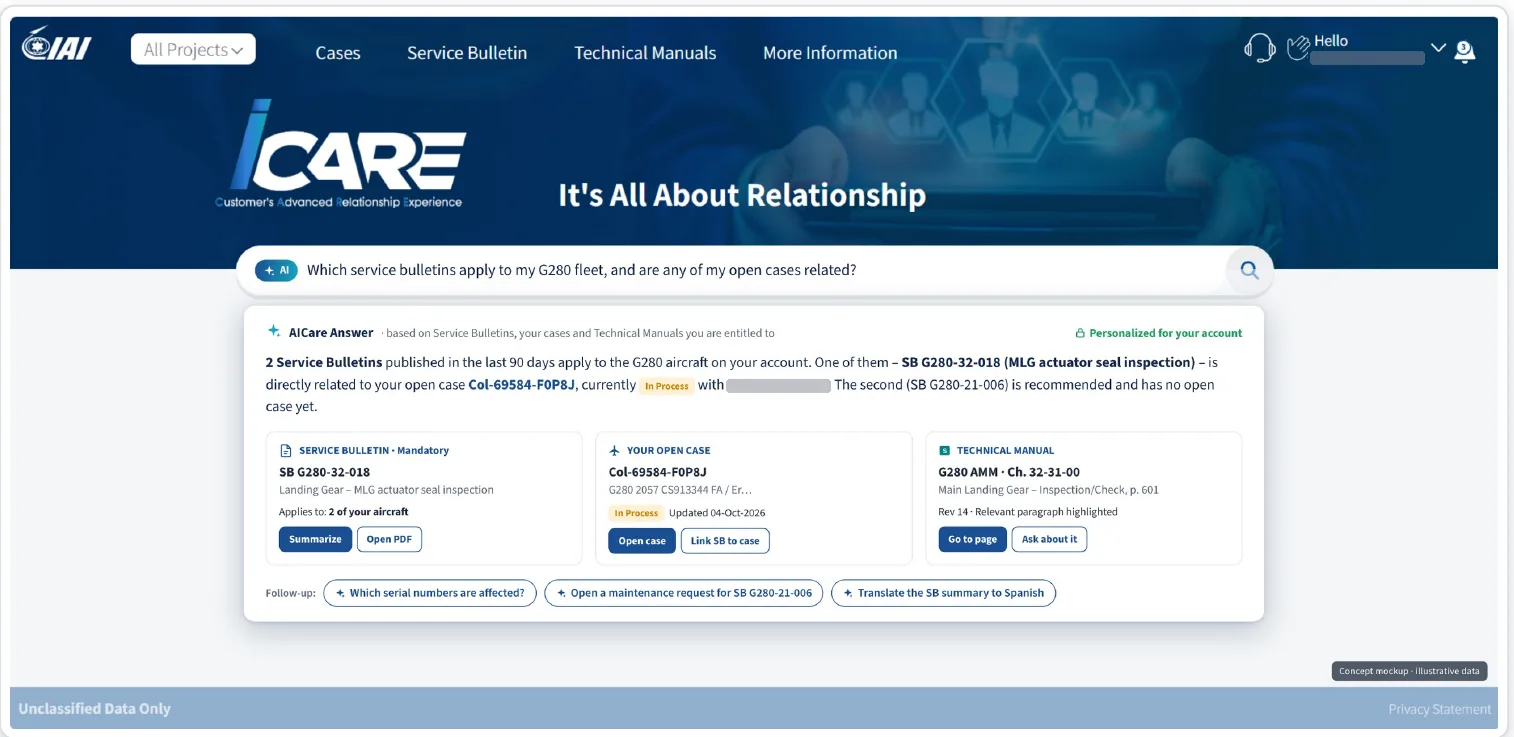
- Search across technical documentation and files, like AICare in the iCare portal
License planning advice
Dynamics 365 licensing depends on the type of user and the apps they need. Poor planning costs money every month. We help you build a license mix that matches what each user actually does.
- Mapping users by role and usage
- Distinguishing full users, light users and portal users
- Aligning licensing with the solution design, for example Power Apps versus Dynamics 365
- A fresh review when usage changes
What does a Dynamics 365 project with us look like?
The project follows the Zooz-Tech Delivery method, adapted to Dynamics. Each phase closes with your approval before we move on. We describe the implementation steps themselves on the Dynamics 365 page, and the full method in How we work: Delivery & POC.
Discovery and a first demo
A workshop with process owners, users and IT. We map processes, data and systems, and show a first demo on your own process.
Specification and a first phase
Requirements and design with a prototype you can try, written acceptance criteria, and a choice of the process that goes live first.
Development in sprints
At the end of every sprint we show a working system. Your feedback goes into the next sprint.
Migration and acceptance
Data migration and user acceptance testing (UAT) with your users, against the criteria written in the specification.
Phased go-live and support
We go live with a first group of users, fix what comes up in the field and expand. The same team stays on for ongoing support.
How do you keep a CRM project under control?
A CRM project touches many people and many systems. Four rules keep it on time and on scope.
Sprints and demos
Milestones set in advance and a demo at the end of every sprint. You see progress in the system itself, not in a slide deck.
Approvals and scope changes
Each phase closes with your approval. Scope changes are decided together, with their impact on time and cost.
Separate environments
Development, test and production run in separate environments. Changes move between them as controlled solution packages, with the option to roll back to the previous version.
One team, one owner
The same team specifies, builds, rolls out and supports, led by our Head of Delivery. No handoffs between vendors.
Which Dynamics 365 systems have we built and do we maintain?
The iCare portal and the AICare layer
A Power Pages customer portal on Dynamics 365 that we built and maintain: service cases, shipments, Service Bulletins and technical documentation. On top of it, AICare: search across technical documentation with chapter and page citations, opening a case from a photo of a nameplate, and voice.
Services: development, maintenance and AI
CRM and customer portal, taken over from a previous vendor
We took over development of the Dynamics 365 CRM and the Power Pages customer portal from a previous vendor. We develop and maintain: a mobile-friendly portal, contacts synced with SAP, distribution of letters and WhatsApp messages, and intake of requests from the company website.
Services: system takeover, development, maintenance and SAP integration
An enterprise CRM and two portals
The CRM of Israel's largest volunteer organization, on Dynamics 365 with Dataverse as a single source of truth. Two Power Pages portals, for instructors and for parents, volunteer scheduling and automatic reminders, and reports in Power BI.
Services: development, portals and ongoing maintenance
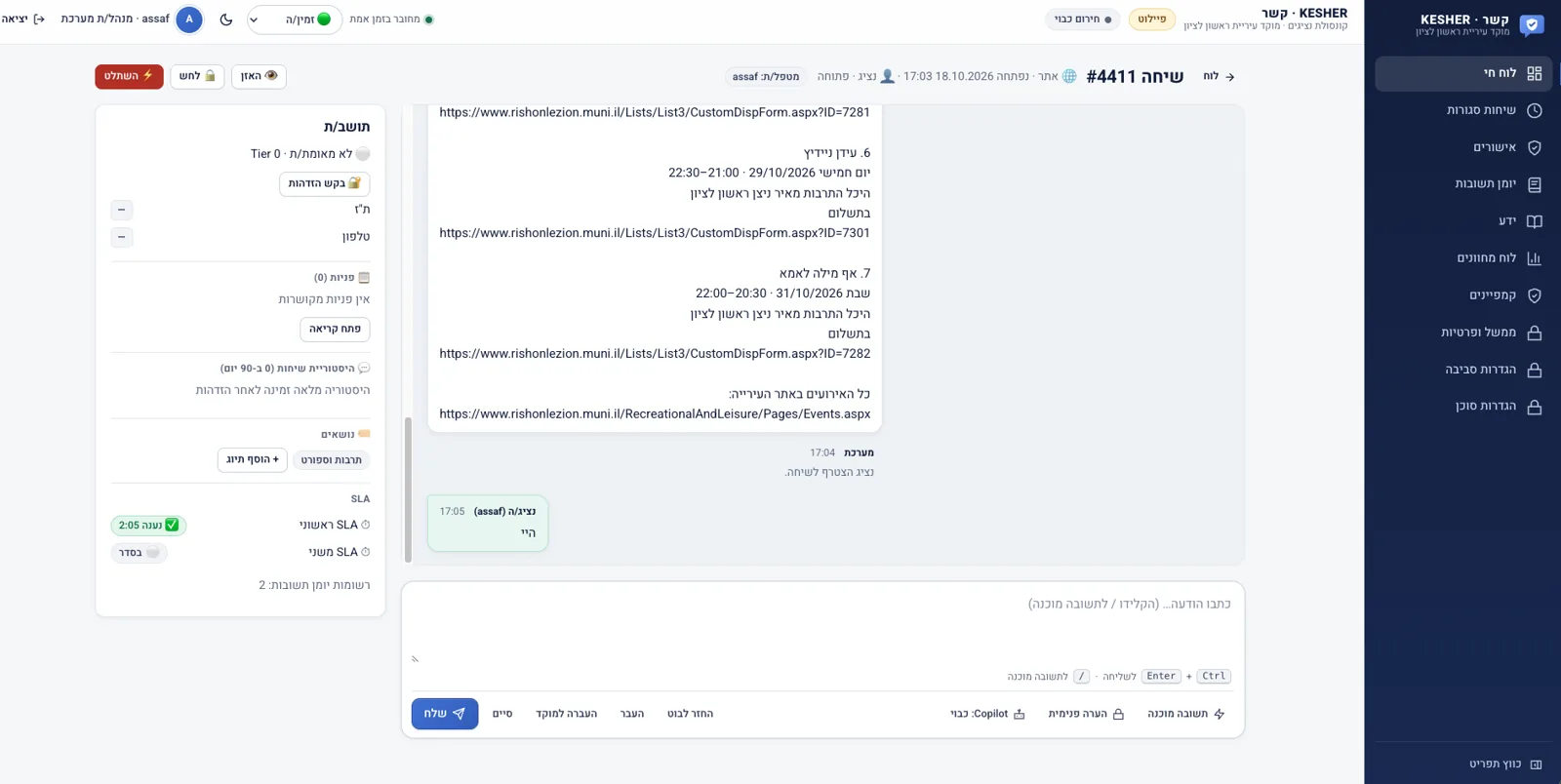
KESHER connected to Dynamics 365
Every KESHER conversation, on the website, on WhatsApp and by voice, is logged in the municipality's CRM. The agent sees the full history, and a case opens in the CRM with one click.
Services: integration and AI
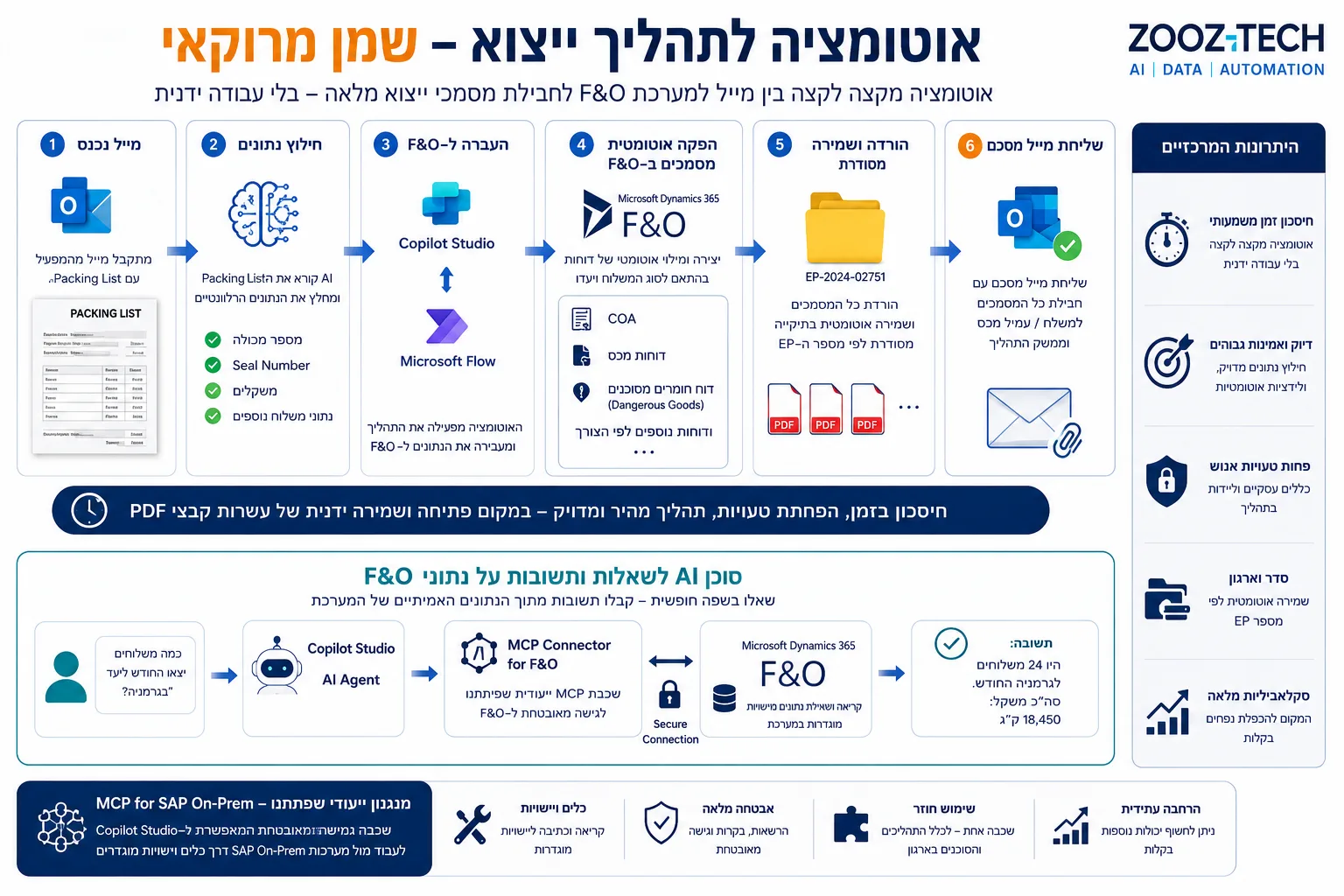
Export automation in Dynamics 365 F&O
From a single Packing List email to a complete export document package in Dynamics 365 F&O, plus an AI agent that answers free-form questions about the data through MCP.
Services: automation and AI
Articles and guides on Dynamics CRM
Worth reading before you choose a system, budget a project or add a channel.
Dynamics 365 vs. Salesforce: how to choose
A factual comparison of two enterprise CRM systems, and when each one is the better fit.
Read the guide → Guide · Choosing a CRMDynamics 365 vs. monday and Fireberry
When a lighter CRM is enough, and when your organization needs Dynamics 365.
Read the guide → Guide · CostsHow much does a CRM implementation cost?
What the cost is made of: licensing, implementation, migration, integrations and maintenance.
Read the guide → Guide · IntegrationsConnecting your CRM to WhatsApp
How to send and receive WhatsApp messages from inside the CRM, and what to check before you start.
Read the guide → Guide · AI agents and Dynamics 365How to connect an AI agent to Dynamics 365 and keep permissions intact
Three ways: Copilot Studio, Azure AI Foundry with the Web API, and an MCP layer.
Read the guide → Guide · PortalsHow to build a secure customer portal in Power Pages
Sign-in, record-level permissions, forms and payments, and when to use Power Pages versus full custom development.
Read the guide →Frequently asked questions about Dynamics CRM services
How long does a Dynamics 365 implementation take?
It depends on scope: how many processes are included, how much data is migrated and how many systems are connected. Zooz-Tech works in phases: a focused first phase, for example a single sales or service process, goes live, and we expand from there. We give a precise timeline after the requirements and design phase.
Can we move a Dynamics system built by another vendor to you?
Yes. Zooz-Tech takes over Dynamics 365 systems developed by other vendors: we review the entities, code and integrations, document them, and continue development and support. This is how we took over development of Mekorot's CRM and customer portal.
Do you upgrade on-premises Dynamics CRM to the cloud?
Yes. Migrating from Dynamics CRM on-premises to Dynamics 365 starts with mapping existing customizations and code: what moves as is, what is replaced by a built-in capability and what is no longer needed. Then we migrate the data, adapt integrations and test with users before the cutover.
Do you implement Dynamics 365 Field Service?
Yes. Zooz-Tech implements Field Service: work orders from service cases, technician scheduling, a mobile app for field staff and preventive maintenance, connected to customer data in the CRM and to systems such as SAP or Priority ERP.
Do you help choose Dynamics 365 licenses?
Yes, at the planning level. We map users by what they actually do and propose a license mix that fits the solution: full users, light users and portal users. Current prices should be checked with Microsoft or your organization's licensing provider.
What happens after go-live?
The same team that built the system continues with ongoing support: handling incidents and requests, checking the impact of Microsoft updates, improvements and new development, and adding AI capabilities.
Learn more: Overview: Dynamics 365 & CRM · Power Platform · SAP & Priority integration