

Industries · Higher education and education

Portals and CRM systems for higher education and education

Students handle it themselves in the portal, and the CRM does the rest

Zooz-Tech builds Power Pages portals for higher education institutions and education organizations, for students, applicants, instructors and parents: registration, room assignment, payment, a digital contract and a personal area, on top of a CRM system that manages the entire cycle.

Power PagesDataverseDynamics 365PayPlus paymentsDigital signatureHebrew and English
Clients in this industry
  • Reichman University
  • Kibbutzim College
  • HaShomer HaChadash
  • The Histadrut

In short

Zooz-Tech, a software development company and Microsoft Partner in Israel, part of the Peax group (listed on the Tel Aviv Stock Exchange), has built five solutions in higher education and education that run today at four clients: the dorms portal and resident request system at Reichman University, an enrollment portal at Kibbutzim College, portals for instructors and parents at HaShomer HaChadash, and a portal for new employees at the Histadrut (Israel's General Federation of Labor). In the dorms portal, it takes about 10 seconds from payment to a contract ready for signature, and card details are not stored in the portal.

Industry challenges

What makes registration, dorms and payments hard to manage at an academic institution?

Without a portal, every moment in the student's year goes through the phone, email and manual work by the staff. These are the moments that repeat at every institution.

Registration by forms and email

Registration by forms and email, and manual checks of available places and preferences.

Payments updated by hand

Payment by phone or bank transfer, and someone manually records that the money arrived.

Waiting for the contract

A contract is prepared manually, sent out, and then you wait for it to come back signed.

Requests with no owner, and renewal from scratch

A request arrives by phone or email, and there is no way to know who is handling it and when. And next year, students register again and fill in the same details.

Our projects in this industry

Which portals have we built for higher education and education?

Five solutions at four clients, by client. All of them are Power Pages portals, on the same data the staff works with.

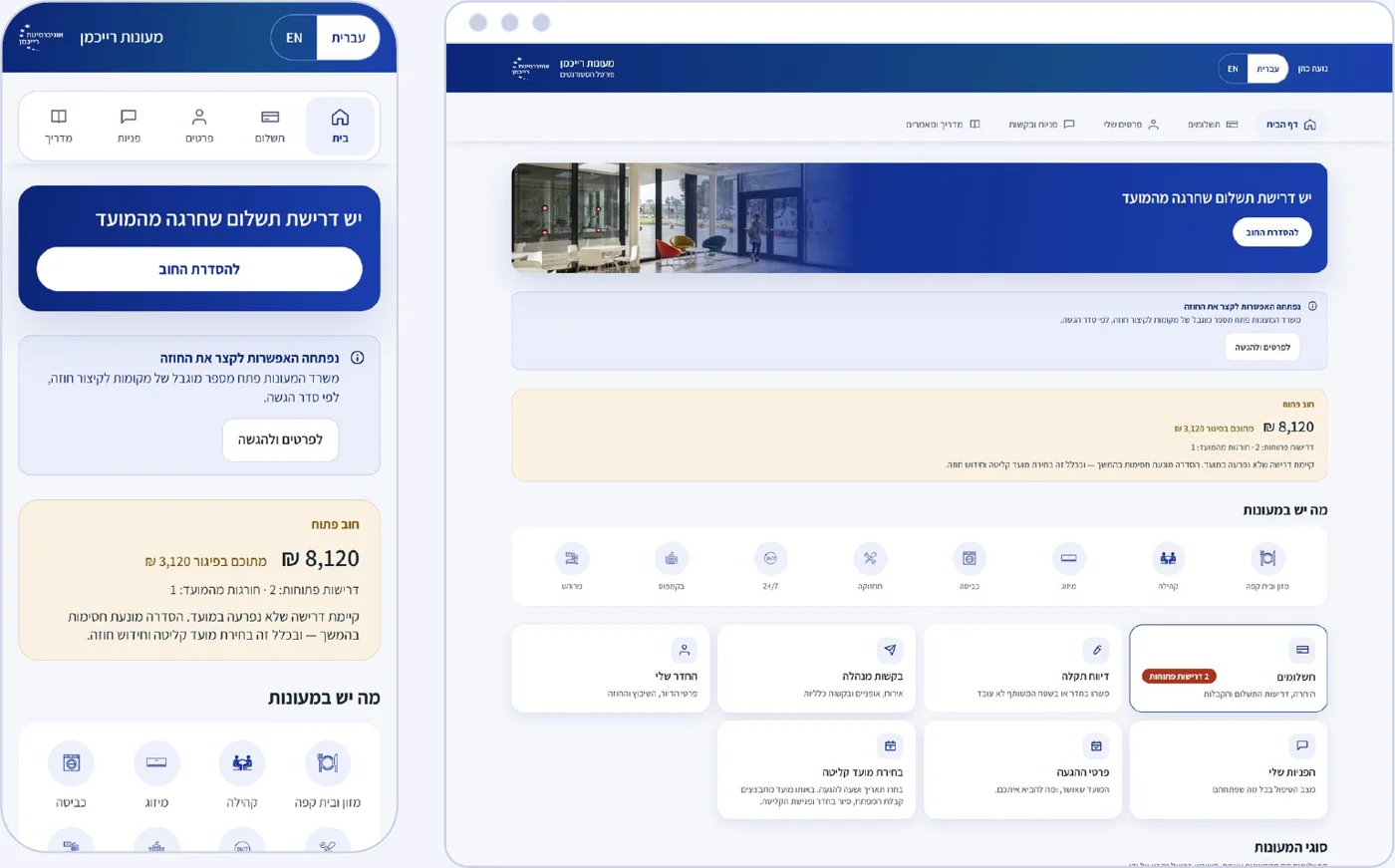
The personal area in the Reichman University student dorms portal
Reichman University

Student dorms portal

A portal where students register, pay, sign their contract and manage their entire year in the dorms. Behind every screen, a CRM system assigns rooms, collects payments, generates contracts and opens requests for the staff, automatically.

  • Sign-in with a one-time code sent by email, no passwords
  • Personal details are loaded from the academic system
  • Secure PayPlus payment processing: card details never pass through the portal
  • A digital contract that is selected and sent for signature automatically
  • Hebrew and English, on desktop and mobile
~10seconds from payment to a contract ready for signature
0card details stored in the portal
5processes in one portal
2languages, on desktop and mobile

From registration to contract, paperless

Power PagesDataverseCRMPayPlusDigital signature
The full project story →

Registration and room assignment

Only housing types with available places are shown, with the monthly price. Preferences such as Shabbat observance and joining the preparatory period. After the registration fee is paid, the system assigns a room by preference and availability, and if there is no place, adds the student to a waiting list.

Payments

The card is saved as a token for the deposit and the monthly charge. The deposit can be paid three ways: a saved card, another card or a bank transfer with a reference. An open balance blocks actions such as renewal, and the student sees this in advance.

Digital contract

As soon as the deposit is paid, the system selects the right contract version and sends it for digital signature. The portal updates itself when the signature is complete. Shortening, cancellation and renewal are separate processes, and the amounts are shown in advance.

Personal area and renewal

The top card changes according to what the resident needs now: to pay, to choose a move-in date or to renew. Renewal for next year without registering again: the room is kept and the deposit carries over.

The dorms portal: five moments in the year, before and after
The momentBeforeNow
Dorms registrationRegistration by forms and email, and manual checks of available places and preferences.The student chooses housing with an available place, and the system assigns a room on its own after the registration fee.
Deposit paymentPayment by phone or bank transfer, and someone manually records that the money arrived.Secure PayPlus payment processing, a card saved as a token, and an open balance shown in advance.
ContractA contract is prepared manually, sent out, and then you wait for it to come back signed.About 10 seconds from payment to a contract ready for digital signature, and the portal updates when the signature is complete.
A fault in the roomA request arrives by phone or email, and there is no way to know who is handling it and when.A report with a photo opens a request in the CRM, routed to the right team with a target resolution time.
Renewal for next yearStudents register again from scratch and fill in the same details.A renewal request without registering again: the room is kept and the deposit carries over to next year.
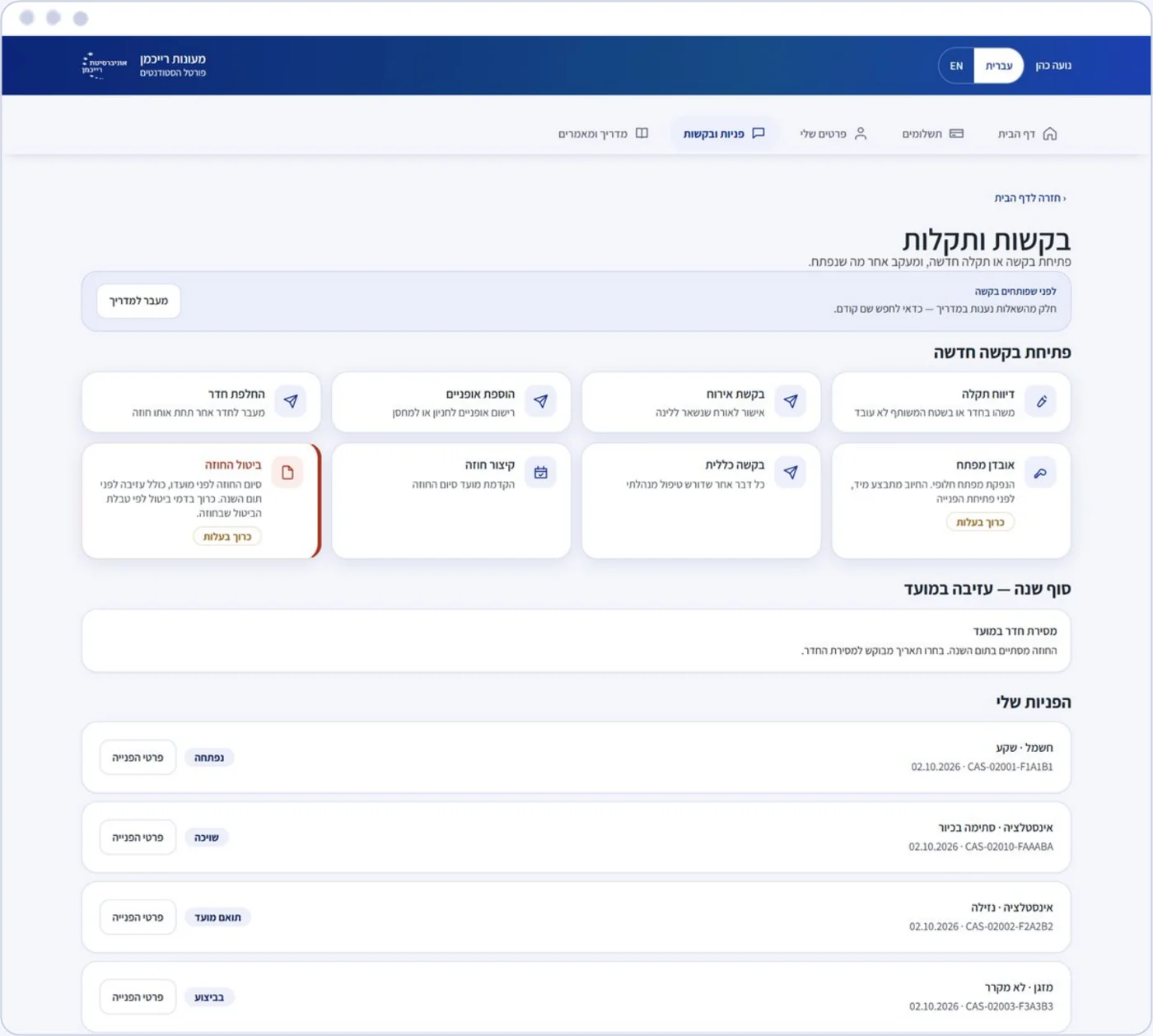
Resident requests in the personal area, each one opened in the CRM
Reichman University

Resident requests

The staff sees all requests in one place, with status, assignment and tracking, without chasing anyone.

  • Fault reports with photos, guest requests, bicycle registration, lost keys and room changes
  • Every request opens in the CRM automatically
  • Routing to the right team, with a target resolution time
BeforeA request arrives by phone or email, and there is no way to know who is handling it and when.
NowA report with a photo opens a request in the CRM, routed to the right team with a target resolution time.

Every request has an owner and a status

Power PagesPower AutomateCRM
The Reichman University project →
Kibbutzim College
Kibbutzim College

An enrollment portal for applicants

A portal for prospective students: enrollment, document upload and application status tracking, in one place.

  • Enrollment for studies in the portal
  • Document upload
  • Application status tracking

End-to-end digital enrollment

Power Pages
Clients & projects →
HaShomer HaChadash: an organizational CRM on Dynamics 365 and two Power Pages portals
HaShomer HaChadash

An organizational CRM and portals for instructors and parents

The CRM of Israel's largest volunteer organization, on Dynamics 365 and Dataverse as a single source of truth, with two Power Pages portals for instructors and parents in the youth movement.

  • A portal for instructors and a portal for parents, on the same data
  • Automatic scheduling and reminders for volunteers in Power Automate
  • Reports in Power BI
  • Ongoing development and maintenance

A single source of truth for all activity

Dynamics 365Power PagesPower AutomatePower BI
HaShomer HaChadash project card →
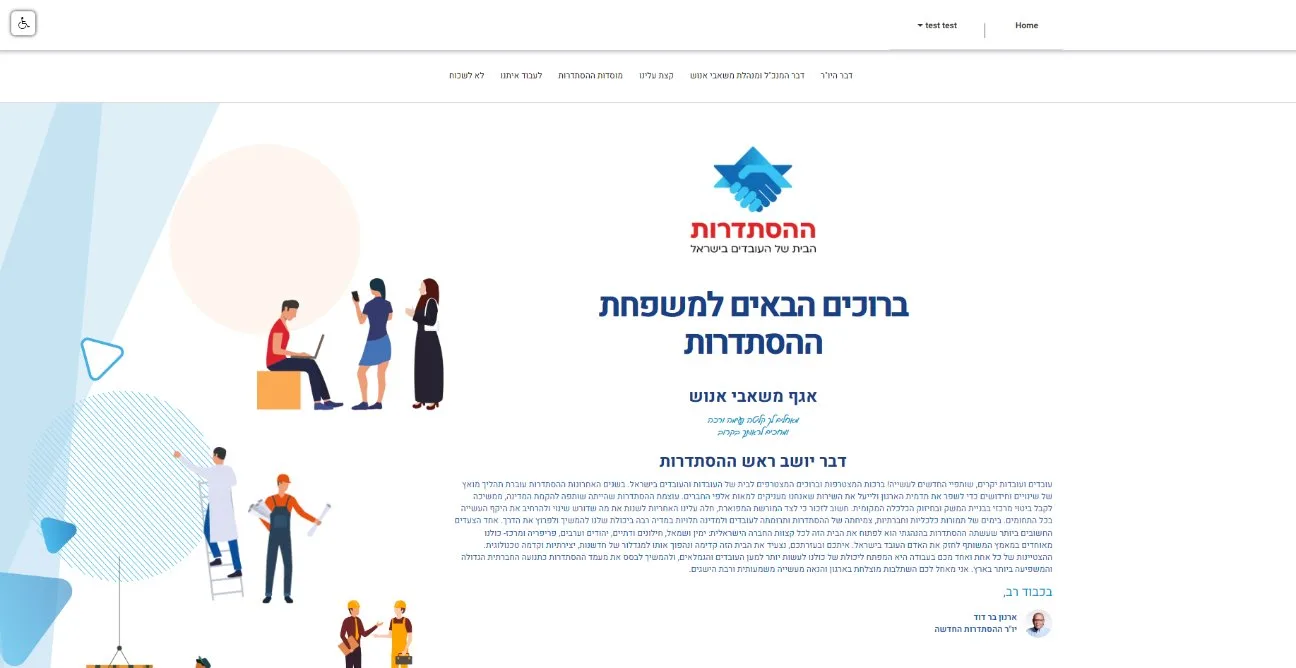
The Histadrut onboarding portal for new employees
The Histadrut

A portal for new employees

An external portal with Azure B2C sign-in: information before arrival, documents to sign and a personal area. An example of the same type of portal outside academia, for onboarding new employees.

  • Secure sign-in with Azure B2C
  • Information before arrival
  • Documents to sign
  • A personal area

Onboarding that starts before day one

Power PagesAzure B2C
The Histadrut project card →
Power Pages and CRM

What works behind a student portal?

The student sees a portal. Behind it, a CRM assigns rooms, collects payments and generates contracts on its own, and the staff sees every request, payment and contract.

What it is

An external portal in Power Pages on Dataverse and Dynamics 365: sign-in, a personal area, forms and payments, on the same data the staff works with.

When to choose it

When students and applicants need a secure personal area, and the staff manages the entire cycle in one CRM.

What we build

Sign-in with a one-time code and no passwords, PayPlus payments and digital signature, and every request opened in the CRM with a target resolution time.

Power Pages or a fully custom portal?

If the data is already in Dynamics 365 or Dataverse, and the portal is mainly forms, a personal area and requests, Power Pages will go live faster and be secure from the ground up. Full custom development fits when the experience is the product itself, when the audience is very large, or when the data is not in the Microsoft ecosystem.

Go deeper: Power Pages or a fully custom portal: how to choose · A secure customer portal in Power Pages

How we work

How do you start a student portal?

Start with one student process, and expand to the entire cycle. You decide on the investment after you have seen the solution working on your information.

  1. Discovery

    We map the process, the users and the systems, and present a first demo for you to approve.

  2. POC on your data

    A working version of one process, with a scope and date set in advance.

  3. Go / No-Go

    Measure against the success metric, and decide together whether to continue.

  4. Design and development

    Screens designed for the people who use them, and a working system at the end of every sprint.

  5. Phased rollout

    A first group, then expansion to the entire cycle, with the same team.

A product-grade experience

User experience is part of the design from the start. That is what decides whether students actually use the portal.

Card details never pass through us

The card fields are PayPlus secure fields, and card details never pass through the portal.

For students from around the world

Hebrew and English, on desktop and mobile, for Israeli and international students.

Certified, and the same team

Microsoft Partner, ISO/IEC 27001, and the same team supports you after go-live.

Frequently asked questions

How do students sign in to the portal, and do they need a password?

No password is needed. In the Reichman University dorms portal, students sign in with a one-time code sent by email, and their personal details are loaded from the academic system.

How are payments secured in a student portal?

The card fields are PayPlus secure fields, and card details never pass through the portal. The card is saved as a token for the deposit and the monthly charge.

Is the portal connected to the institution's CRM?

Yes. Behind every screen, a CRM system assigns rooms, collects payments, generates contracts and opens requests for the staff. Every request opens in the CRM and is routed to the right team, with a target resolution time.

Does the portal work for international students?

Yes. The dorms portal works in Hebrew and English, on desktop and mobile, for Israeli and international students.

When should the portal be built in Power Pages, and when with full custom development?

If the data is already in Dynamics 365 or Dataverse, and the portal is mainly forms, a personal area and requests, Power Pages will go live faster and be secure from the ground up. Full custom development fits when the experience is the product itself, when the audience is very large, or when the data is not in the Microsoft ecosystem.

Need a portal that manages the entire cycle, from registration to renewal?

Choose one process: registration, dorms, payments or requests. We will come back with a POC proposal: what we build, what counts as success and when we present.

Book a callView the industry deck