


AI and systems for insurance, finance and consulting

Hundreds of documents in a file. One report, and a source for every finding

Zooz-Tech builds AI for insurance, finance and consulting that reads the case file, builds a report from it and links every finding to its document, within your permissions and in your organization's Azure. This page lists all our projects in the industry, and finance processes we built for clients in other industries.

Azure AI Document IntelligenceAzure AI SearchAzure AI FoundryCopilot StudioSAPPriority ERP
Let's talkSee projects
  • KPMG
  • Bank Hapoalim
  • Migdal Insurance
  • Hachshara Insurance
  • Hapool
  • Fischer (FBC)

In short

Zooz-Tech is a software development company and Microsoft Partner in Israel that builds systems for insurance, finance and consulting that stand up to the question "based on what?". For an insurance company (a confidential client) we built a living claim file narrative that turns hundreds of documents into one report in which every finding links to its document. For KPMG we built a system for setting up and managing processes and tasks. The same capabilities also run in finance processes at clients in other industries: invoice approvals in Priority ERP for AlgoSec, an invoice agent working against SAP for Gil Car, and Document AI for handwriting and receipts for Tadiran.

5solutions for five clients, from the case file to the invoice
6control layers, each already running at a client
1report from the hundreds of documents in a claim file
Industry challenges

What challenges do insurance, finance and consulting firms face?

Case files with hundreds of documents, multiple validations and a requirement for full documentation. This is how it looked before the systems went live.

A file with hundreds of documents

The examiner reads scans, medical reports, policies and correspondence one by one, and builds a timeline in a manual table. Every new document reopens the picture.

Documents that are hard to read

A handwritten receipt or a skewed photo in poor light. Someone types it in by hand, guesses unreadable digits and corrects them later.

Invoices and approvals by email

Manual checks against several sources before every posting, and corrections when a duplicate slips through. The invoice travels by email between approvers, and nobody knows where it is stuck.

"Based on what?"

The auditor asks which document a finding relies on. People search folders and emails, and are not sure they are allowed to show everything they find.

Our projects in the industry

What systems have we built for insurance, finance and consulting?

Projects are grouped by client. At the end: finance processes we built for clients in other industries, which work the same way in a financial organization.

An insurance company · Confidential client

Our flagship project in the industry. The client's name is not published, and identifying details in the screenshot are redacted.

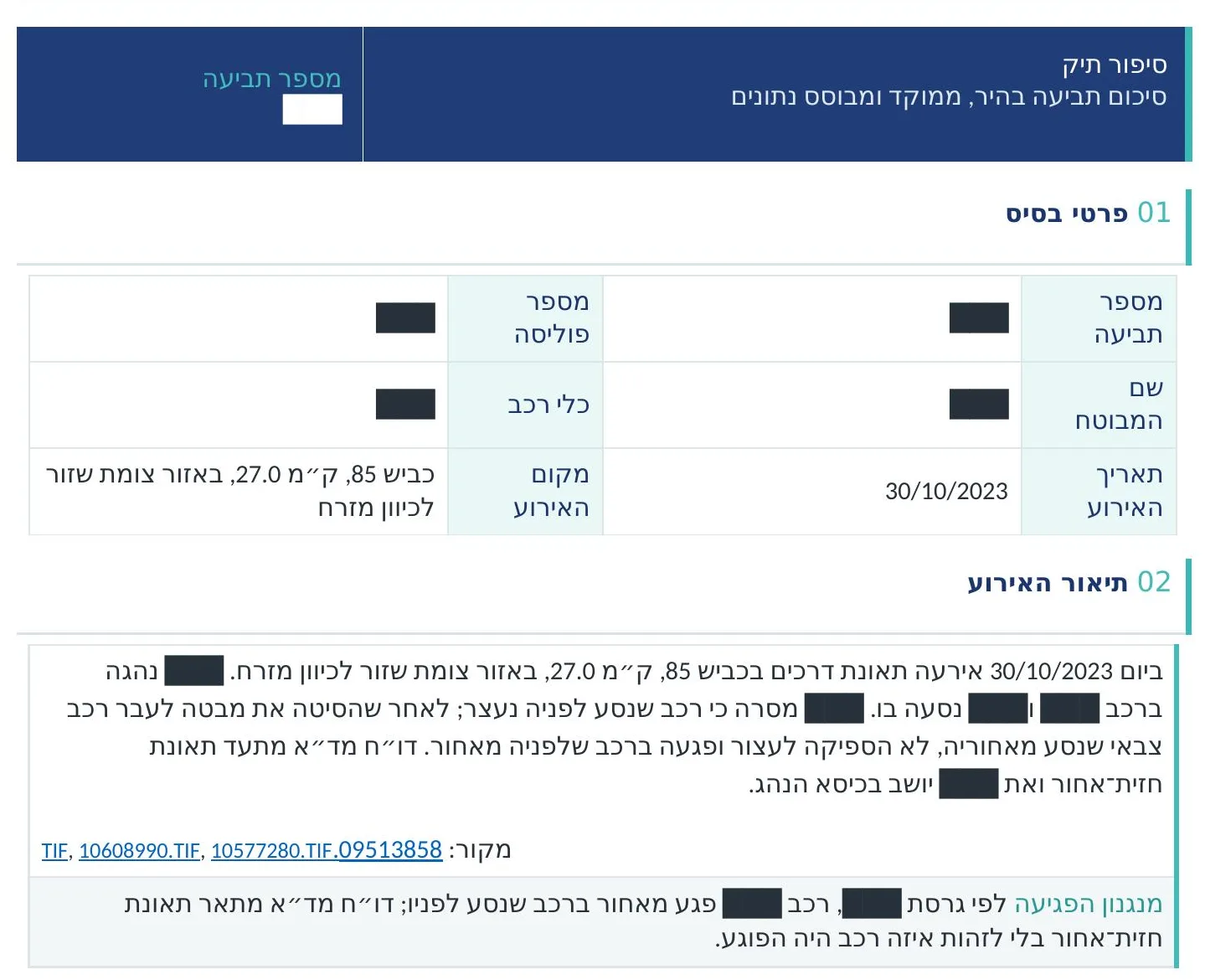
An excerpt from a case narrative report, identifying details redacted
Insurance and claims · Flagship project

A living, dynamic claim file narrative

A system that reads every document in the file, scans, medical reports, policies and correspondence, and builds one report from them: a timeline of events, each party's version in one place, and contradictions and gaps flagged. Every finding in the report links to the document it came from, and clicking the link opens the document itself. When a scan is hard to read, a vision model completes the reading. The report updates with every new document added to the file.

Before

The examiner builds the picture by hand, document after document, and every new document reopens it.

Today

The examiner gets the case narrative before opening the file, and reviews and decides based on a report with sources.

Document IntelligenceAzure AI SearchAzure AI Foundry

Result: Hundreds of documents, one report, and every finding linked to its document. Runs in the organization's Azure and within its permissions.

Project details →
KPMG

Team workflows and tasks in one system, instead of spreadsheets and email.

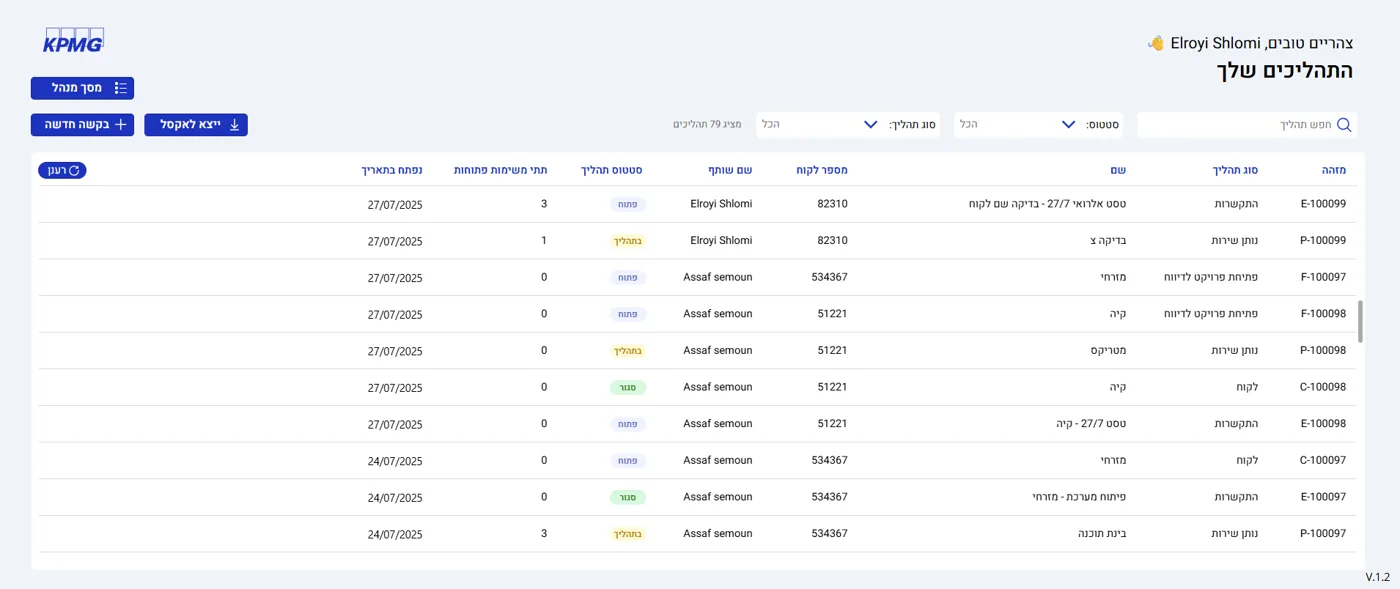
A system for setting up processes and tasks
KPMG · Power Apps

Setting up and managing processes and tasks

A system for setting up and managing workflows and tasks. The process stages are defined in one system, all of the process tasks sit in one place, and Power Automate moves the process forward with approval rounds and tracking, without emails.

Before

The process lives in spreadsheets and email, and everyone sees a different part of it.

Today

Stages and tasks in one place, and Power Automate moves the process forward.

Power AppsPower Automate

Result: One consistent process for all teams.

Project details →

Finance processes at clients in other industries

These clients are not insurance or finance companies, but the processes are finance processes in every sense: invoices, approvals and posting to the ERP.

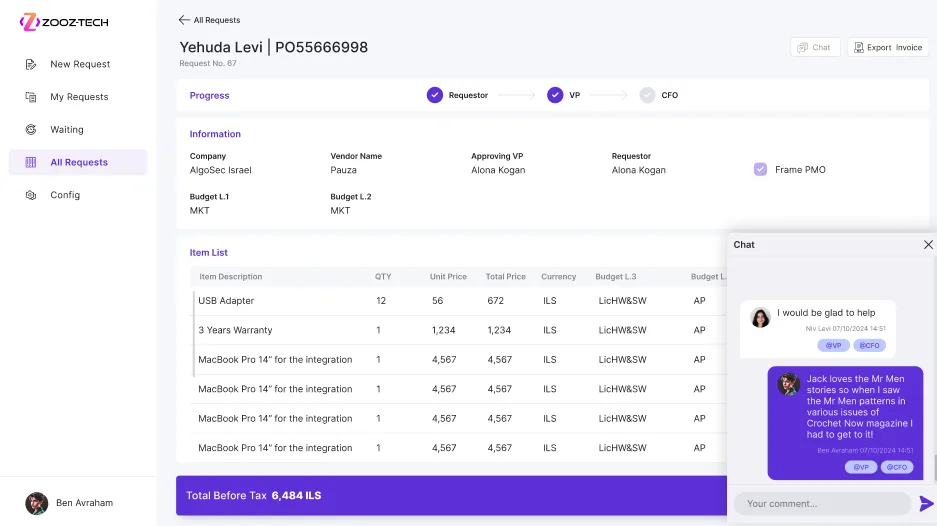
Approving an invoice against Priority
AlgoSec · Priority

Invoice approvals in Priority

A dynamic approval round for invoices: each invoice has its own approvers, and each approver sees in one app what is waiting for them, with a status indicator. The approval takes action directly in Priority, updates the system and completes the process.

Before

The invoice travels by email between approvers, and nobody knows where it is stuck.

Today

One documented approval round, connected to Priority.

Power AppsPriority ERP

Result: A documented approval round, inside Priority.

Project details →
The invoice process and the MCP layer against SAP
Gil Car · SAP

An invoice agent against on-premises SAP

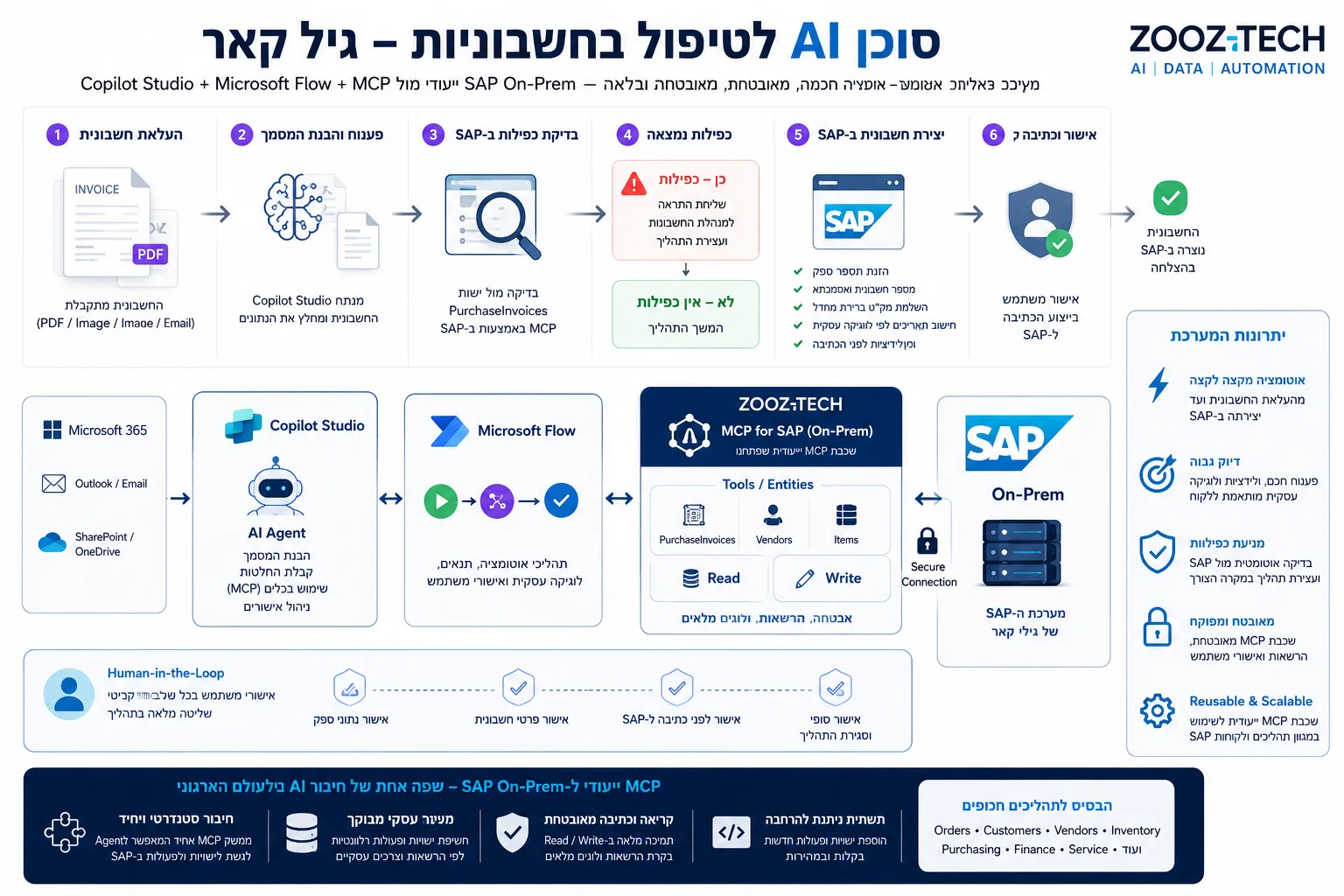
An agent in Copilot Studio, inside Teams, reads supplier invoices as PDFs or images, checks them against existing records in SAP through an MCP layer we built, and calculates four dates in Power Automate. It then creates a draft in JournalVouchers, even when SAP runs on-premises. The MCP layer exposes only defined entities and actions to the agent.

Before

Manual checks against several sources before every posting, and corrections when a duplicate slips through.

Today

The agent prepares a draft, and an authorized user approves it inside SAP.

Copilot StudioMCPSAPPower Automate

Result: The final posting happens only after manual approval inside SAP.

Project details →
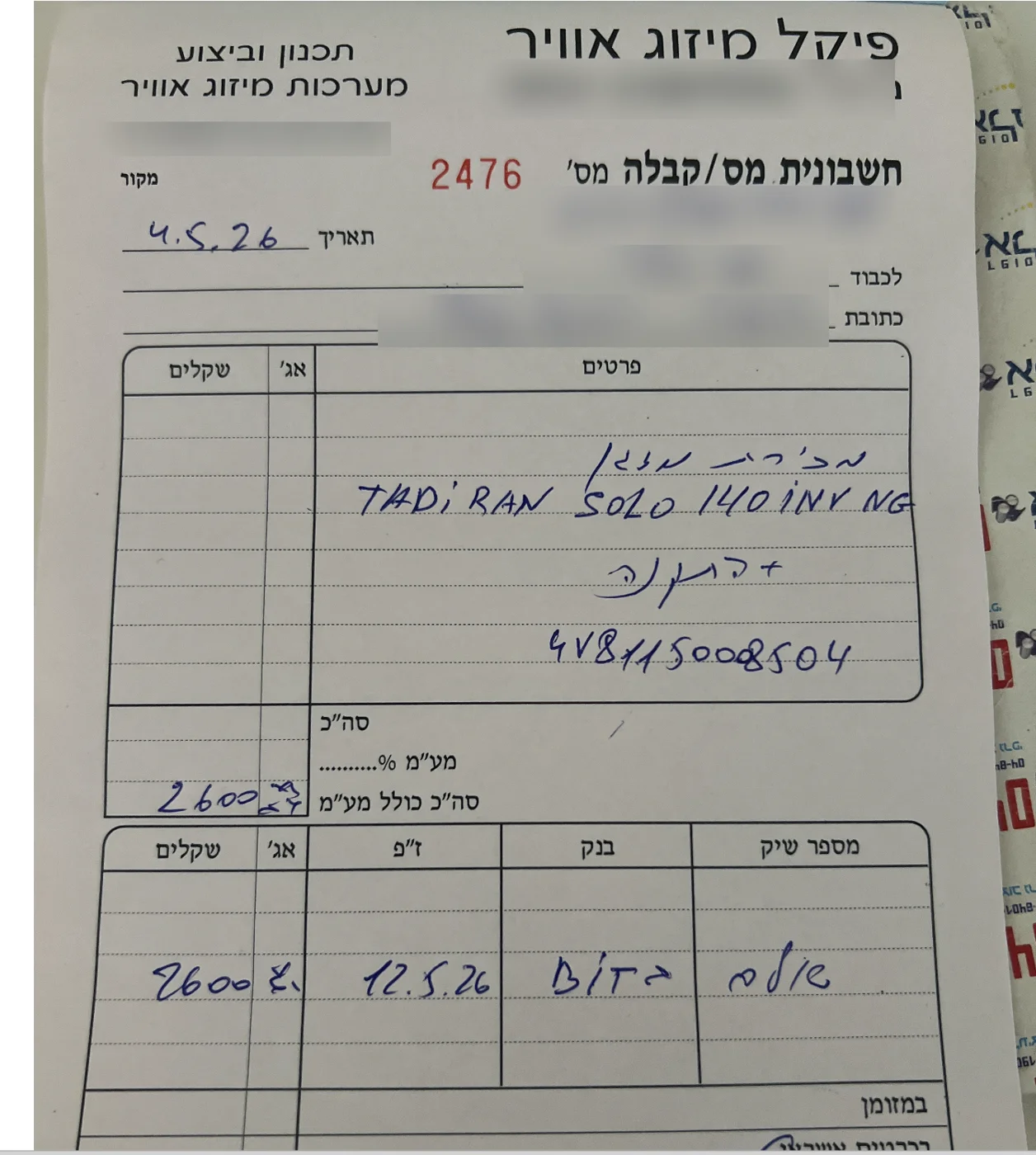
A handwritten invoice read by the system, identifying details blurred
Tadiran · Document AI

Document AI for invoices, receipts and handwriting

A system that reads handwritten invoices and receipts photographed on a phone at an angle and in poor light, in Hebrew and English. It understands what each value is, for example whether 282.00 is a total, VAT or an item price, and returns amounts, dates, identifiers and line items with a confidence level for each field. A vision model steps in when a document is hard to read.

Before

Someone types it in by hand, guesses unreadable digits and corrects them later.

Today

Handwriting and photographed receipts become structured data that goes straight into the process.

Azure AI Document IntelligenceHandwritingMultilingual OCR

Result: Structured JSON output to the ERP, to Excel or through an API.

Read the project story →
Solutions and products

Which solutions fit insurance and finance?

Five solution areas behind the projects on this page.

RAG & data indexing for AI

Indexing case files with hundreds of documents, scans and handwriting in Azure AI Search, with security trimming and source citations. This is the foundation of the case narrative.

View solution →

Document AI

Beyond OCR: handwriting, skewed photos and tables become structured data for the ERP, Excel or an API.

Tadiran's Document AI →

SAP & Priority integration

Agents and apps that read from and write to the ERP, with approval before every write, including on-premises systems.

View solution →

AI & agents

Agents in Copilot Studio and Azure AI Foundry connected to your systems through MCP and working within your permissions.

View solution →

Power Platform

Processes, tasks and approval rounds in Power Apps and Power Automate, as at KPMG and AlgoSec.

View solution →

Further reading: What is RAG · RAG vs. fine-tuning · What is MCP · How much an AI agent costs

How we work

How does AI pass information security and audit review?

Six control layers, each already running at a client. Together they give every answer a source and a permission check.

Layer 1 · Security trimming

Every user sees only what they are allowed to see

Every chunk in the index carries the permissions of its source. In Israel Aerospace Industries' iCare portal, the search over technical literature answers each customer only from what they are allowed to see.

Layer 2 · Source citation

Every finding links to its document

In the case narrative, every line of the report points to the document it came from. The auditor asks "based on what?", and the answer is one click away.

Layer 3 · Grounding gates

An answer without a source does not go out

Grounding gates block an answer with no citation, or with weak grounding, before it is sent. No authoritative source? The system says so and suggests a way forward. Runs in KESHER, a Zooz-Tech product.

Layer 4 · Reading hard documents

Even a hard document is read correctly

A receipt photographed at an angle, in shadow and with tiny text: Document Intelligence reads it, and a vision model steps in when legibility is poor. Runs at Tadiran.

Layer 5 · Approval round

Every invoice goes through its approvers

A dynamic approval round with actions directly in Priority. The approval updates the system and completes the process. Runs at AlgoSec.

Layer 6 · Approval before writing

The agent prepares a draft, a person approves

An MCP layer exposes only defined entities and actions to the agent, and the final posting in SAP happens only after manual approval. Runs at Gil Car.

A partner that stands up to information security review

Certified for information security

ISO/IEC 27001:2022 and ISO 9001:2015 from IQC - Institute of Quality & Control, valid until 02/2029.

Your data stays with you

Models are deployed in your organization's Azure, with data residency and cost control.

A person approves every posting

Validations and user approval before every write, within existing permissions and with a full log.

A POC on a real case file

Start with one file or process, on your own documents and systems. Even if you stop, you keep a grounded assessment of the data, cost and risks.

How we work: delivery & POC →

Frequently asked questions

How does AI help claims examiners?

Zooz-Tech built a system for an insurance company that reads every document in a claim file and builds one report from it: a timeline, each party's version, contradictions and gaps. Every finding links to its document, and the report updates with every new document. The AI does the first reading, and the examiner reviews and decides.

How do you know what the AI based a finding on?

Every finding in the report links to the document it came from, and clicking the link opens it. The examiner sees the source and decides. In systems that answer questions, such as KESHER, grounding gates block an answer with no citation or with weak grounding, and when there is no authoritative source the system says so instead of guessing.

Does customer data leave the organization?

Models are deployed in the organization's Azure, with data residency and cost control, and the system works within existing permissions. Every chunk in the index carries the permissions of its source, and every user gets answers only from what they are allowed to see. Zooz-Tech is certified to ISO/IEC 27001:2022.

Can an AI agent post invoices in SAP or Priority?

Yes, with human approval. At Gil Car, an agent in Copilot Studio checks each invoice against SAP through an MCP layer and creates a draft in JournalVouchers, and the final posting happens only after manual approval inside SAP. At AlgoSec, a dynamic approval round takes actions directly in Priority ERP.

How do you start an AI project in a regulated field?

Pick one case file or process. After a discovery workshop we build a POC on your documents and systems, within your permissions, measure against the success metric and decide together whether to continue. Even if you stop, you keep a grounded assessment of the data, cost and risks.

Do you have case files with hundreds of documents?

Pick one case file or process, and we will come back with a POC proposal: what we build, on which documents, what counts as success and when we present it.

Book a callIndustry deck